1.nginx应用场景 #
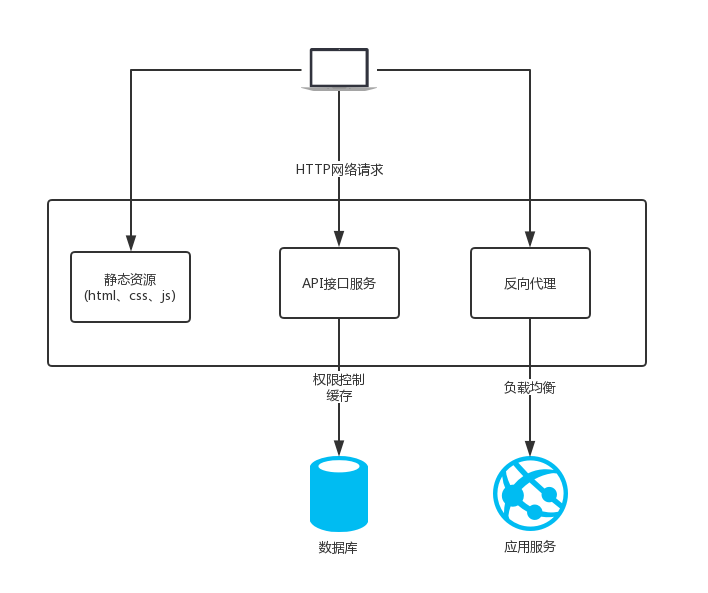
静态资源服务器
反向代理服务
API接口服务(Lua&Javascript)
2.nginx优势 #
高并发高性能
可扩展性好
高可靠性
热布署
开源许可证
3. 学习环境 #
3.1 操作系统 #
centos764位
3.2 环境确认 #
3.2.1 关闭防火墙 #
功能
命令
停止防火墙
systemctl stop firewalld.service
永久关闭防火墙
systemctl disable firewalld.service
3.2.2 确认停用 selinux #
安全增强型 Linux(Security-Enhanced Linux)简称 SELinux,它是一个 Linux 内核模块,也是 Linux 的一个安全子系统。
SELinux 主要作用就是最大限度地减小系统中服务进程可访问的资源(最小权限原则)。
功能
命令
检查状态
getenforce
检查状态
/usr/sbin/sestatus -v
临时关闭
setenforce 0
永久关闭
/etc/selinux/config SELINUX=enforcing 改为SELINUX=disabled
3.2.4 安装依赖模块 #
yum -y install gcc gcc-c++ autoconf pcre pcre-devel make automake openssl openssl-devel
软件包
描述
gcc
gcc是指整个gcc的这一套工具集合,它分为gcc前端和gcc后端(我个人理解为gcc外壳和gcc引擎),gcc前端对应各种特定语言(如c++/go等)的处理(对c++/go等特定语言进行对应的语法检查, 将c++/go等语言的代码转化为c代码等),gcc后端对应把前端的c代码转为跟你的电脑硬件相关的汇编或机器码
gcc-c++
而就软件程序包而言,gcc.rpm就是那个gcc后端,而gcc-c++.rpm就是针对c++这个特定语言的gcc前端
autoconf
autoconf是一个软件包,以适应多种Unix类系统的shell脚本的工具
pcre
PCRE(Perl Compatible Regular Expressions)是一个Perl库,包括 perl 兼容的正则表达式库
pcre-devel
devel 包主要是供开发用,包含头文件和链接库
make
常指一条计算机指令,是在安装有GNU Make的计算机上的可执行指令。该指令是读入一个名为makefile的文件,然后执行这个文件中指定的指令
automake
automake可以用来帮助我们自动地生成符合自由软件惯例的Makefile
wget
wget 是一个从网络上自动下载文件的自由工具,支持通过 HTTP、HTTPS、FTP 三个最常见的 TCP/IP协议 下载,并可以使用 HTTP 代理
httpd-tools
apace压力测试
vim
Vim是一个类似于Vi的著名的功能强大、高度可定制的文本编辑器
目录名
app
存放代码和应用
backup
存放备份的文件
download
下载下来的代码和安装包
logs
放日志的
work
工作目录
4. nginx的架构 #
4.1 轻量 #
源代码只包含核心模块
其它非核心功能都是通过模块实现,可以自由选择
4.2 架构 #
Nginx 采用的是多进程(单线程)和多路IO复用模型
4.2.1 工作流程 #
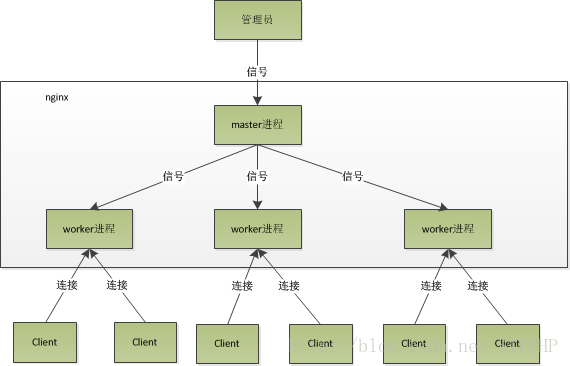
Nginx 在启动后,会有一个 master 进程和多个相互独立的 worker 进程。
接收来自外界的信号,向各worker进程发送信号,每个进程都有可能来处理这个连接。
master 进程能监控 worker 进程的运行状态,当 worker 进程退出后(异常情况下),会自动启动新的 worker 进程。
worker 进程数,一般会设置成机器 cpu 核数。因为更多的worker 数,只会导致进程相互竞争 cpu,从而带来不必要的上下文切换
使用多进程模式,不仅能提高并发率,而且进程之间相互独立,一个 worker 进程挂了不会影响到其他 worker 进程
4.2.2 IO多路复用 #
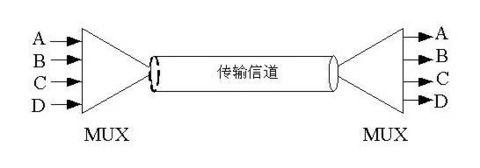
多个文件描述符的IO操作都能在一个线程里并发交替顺序完成,复用线程
4.2.3 CPU亲和 #
把CPU内核和nginx的工作进程绑定在一起,让每个worker进程固定在一个CPU上执行,从而减少CPU的切换并提高缓存命中率,提高 性能
4.2.4 sendfile #
5. nginx安装 #
5.1 版本分类 #
Mainline version 开发版
Stable version 稳定版
Legacy versions 历史版本
5.2 下载地址 #
5.3 CentOS下YUM安装 #
vi /etc/yum.repos.d/nginx.repo
[nginx]
name=nginx repo
baseurl=http :
gpgcheck=0
enabled=1 yum install nginx -y
nginx -v
nginx -V 6. 目录 #
6.1 安装目录 #
查看nginx安装的配置文件和目录
rpm -ql nginx6.2 日志切割文件 #
/etc/logrotate.d/nginx
ls /var /log/nginx6.2 主配置文件 #
路径
用途
/etc/nginx/nginx.conf
核心配置文件
/etc/nginx/conf.d/default.conf
默认http服务器配置文件
6.3 守护进程管理 #
systemctl restart nginx.service 6.4 nginx模块目录 #
路径
用途
/etc/nginx/modules
最基本的共享库和内核模块,
目的是存放用于启动系统和执行root文件系统的命令的如/bin和/sbin的二进制文件的共享库,或者存放32位,或者64位(file命令查看)|
| /usr/lib64/nginx/modules |64位共享库|
6.5 文档 #
路径
用途
/usr/share/doc/nginx-1.14.2
帮助文档
/usr/share/doc/nginx-1.14.0/COPYRIGHT
版权声明
/usr/share/man/man8/nginx.8.gz
手册
6.6 缓存目录 #
路径
用途
/var/cache/nginx
nginx的缓存目录
6.7 日志目录 #
路径
用途
/var/log/nginx
nginx的日志目录
6.8 可执行命令 #
路径
用途
/usr/sbin/nginx
可执行命令
/usr/sbin/nginx-debug
调试执行可执行命令
7. 编译参数 #
7.1 安装目录和路径 #
--prefix=/etc/ nginx
--sbin-path=/usr/ sbin/nginx
--modules-path=/usr/ lib64/nginx/modules
--conf-path=/etc/ nginx/nginx.conf
--error-log-path=/var/ log/nginx/error.log
--http-log-path=/var/ log/nginx/access.log
--pid-path=/var/ run/nginx.pid
--lock-path=/var/ run/nginx.lock 7.2 指定用户 #
--user=nginx   #指定用户
--group=nginx  #指定用户组
8. 配置文件 #
/etc/nginx/nginx.conf #主配置文件
/etc/nginx/conf.d/*.conf #包含conf.d目录下面的所有配置文件
/etc/nginx/conf.d/default.conf
8.1 nginx配置语法 #
# 使用#可以添加注释,使用$符号可以使用变量
# 配置文件由指令与指令块组成,指令块以{}将多条指令组织在一起
http {
# include语句允许把多个配置文件组合起来以提升可维护性
include mime.types ;
# 每条指令以;(分号)结尾,指令与参数之间以空格分隔
default_type application/octet-stream;
sendfile on;
keepalive_timeout 65 ;
server {
listen 80 ;
server_name localhost;
# 有些指令可以支持正则表达式
location / {
root html;
index index.html index.htm ;
}
error_page 500 502 503 504 /50x.html ;
location = /50x.html {
root html;
}
}
}8.2 全局配置 #
分类
配置项
作用
全局
user
设置nginx服务的系统使用用户
全局
worker_processes
工作进程数,一般和CPU数量相同
全局
error_log
nginx的错误日志
全局
pid
nginx服务启动时的pid
8.3 事件配置 #
分类
配置项
作用
events
worker_connections
每个进程允许的最大连接数 10000
events
use
指定使用哪种模型(select/poll/epoll),建议让nginx自动选择,linux内核2.6以上一般能使用epoll可以提高性能
8.4 http配置 #
/etc/nginx/nginx.conf
一个HTTP下面可以配置多个server
user nginx; 设置nginx服务的系统使用用户
worker_processes 1 ; 工作进程数,一般和CPU 数量相同
error_log /var /log/nginx/error.log warn; nginx的错误日志
pid /var /run/nginx.pid ; nginx服务启动时的pid
events {
worker_connections 1024 ;每个进程允许的最大连接数 10000
}
http {
include /etc/nginx/mime.types ;
default_type application/octet-stream;
log_format main '$remote_addr - $remote_user [$time_local] "$request" '
'$status $body_bytes_sent "$http_referer" '
'"$http_user_agent" "$http_x_forwarded_for"' ;
access_log /var /log/nginx/access.log main;
sendfile on;
#tcp_nopush on;
keepalive_timeout 65 ;
#gzip on; # 启用gzip压缩
include /etc/nginx/conf.d 8.5 server #
/etc/nginx/conf.d/default.conf
一个server下面可以配置多个location
server {
listen 80 ;
server_name localhost;
#charset koi8-r;
#access_log /var /log/nginx/host.access .log main;
location / {
root /usr/share/nginx/html;
index index.html index.htm ;
}
#error_page 404 /404. html;
# redirect server error pages to the static page /50x.html
# 把后台错误重定向到静态的50x.html 页面
error_page 500 502 503 504 /50x.html ;
location = /50x.html {
root /usr/share/nginx/html;
}
}8.6 Systemd #
系统启动和服务器守护进程管理器,负责在系统启动或运行时,激活系统资源,服务器进程和其他进程,根据管理,字母d是守护进程(daemon)的缩写
8.6.1 配置目录 #
配置目录
用途
/usr/lib/systemd/system
每个服务最主要的启动脚本设置,类似于之前的/etc/initd.d
/run/system/system
系统执行过程中所产生的服务脚本,比上面的目录优先运行
/etc/system/system
管理员建立的执行脚本,类似于/etc/rc.d/rcN.d/Sxx类的功能,比上面目录优先运行,在三者之中,此目录优先级最高
8.6.2 systemctl #
监视和控制systemd的主要命令是systemctl
该命令可用于查看系统状态和管理系统及服务
命令:systemctl  command name.service
启动:service name start –>systemctl start name.service
停止:service name stop –>systemctl stop name.service
重启:service name restart–>systemctl restart name.service
状态:service name status–>systemctl status name.service
8.7 启动和重新加载 #
systemctl restart nginx.service
systemctl reload nginx.service
nginx -s reload
8.8 日志类型 #
8.8.1 日志类型 #
/var/log/nginx/access.log 访问日志
/var/log/nginx/error.log 错误日志
类型
用法
语法
log_format name [escape=default[json] string]
默认
log_format combined " "
Context
http
8.8.2.1 内置变量 #
ngx_http_log_module
log_format
名称
含义
$remote_addr
客户端地址
$remote_user
客户端用户名称
$time_local
访问时间和时区
$request
请求行
$status
HTTP请求状态
$body_bytes_sent
发送给客户端文件内容大小
8.8.2.2 HTTP请求变量 #
注意要把-转成下划线,比如User-Agent对应于$http_user_agent
名称
含义
例子
arg_PARAMETER
请求参数
$arg_name
http_HEADER
请求头
$http_referer $http_host $http_user_agent $http_x_forwarded_for(代理过程)
sent_http_HEADER
响应头
sent_http_cookie
IP1->IP2(代理)->IP3 会记录IP地址的代理过程
http_x_forwarded_for=Client IP,Proxy(1) IP,Proxy(2) IP
8.8.3 示例 #
# 定义一种日志格式
log_format main '$remote_addr - $remote_user [$time_local] "$request" '
'$status $body_bytes_sent "$http_referer" '
'"$http_user_agent" "$http_x_forwarded_for"' ;
log_format zfpx '$arg_name $http_referer sent_http_date"' ;
# 指定写入的文件名和日志格式
access_log /var /log/nginx/access.log main; tail -f /var /log/nginx/access.log
221.216 .143 .110 - - [09 /Jun /2018 :22 :41 :18 +0800 ] "GET / HTTP/1.1" 200 612 "-" "Mozilla/5.0 (Windows NT 6.1; Win64; x64) AppleWebKit/537.36 (KHTML, like Gecko) Chrome/62.0.3202.94 Safari/537.36" "-" 9. nginx工作流 #
9.1 配置块 #
请求到来时先按域名找到server块
再按请求路径找到location块
Context是指本指令出现在哪个块内
main
http{
upstream {}
server {
if (){}
location{
}
location{
location{
}
}
}
server{
}
}9.2 值指令继承规则 #
值指令可以合并,动作类指令不可以合并值指令是向上覆盖的,子配置不存在,可以使用父配置块的指令,如果子指令存在,会覆盖父配置块中的指令
server {
listen 80 ;
root /home/nginx/html;
access_log logs/access.log main;
location /image{
access_log logs/access.log image;
}
location /video{
}
}9.3 server匹配 #
精确匹配
*在前
*在后
按文件中的顺序匹配正则式域名
default server
9.4 HTTP请求处理 #
阶段
名称
对应模块
读取请求后
POST_READ
realip
重写
SERVER_REWRITE
rewrite
匹配location
FIND_CONFIG
rewrite
重写
REWRITE
rewrite
重写后
POST_REWRITE
访问前限制
PREACCESS
limit_conn,limit_req
是否有权限访问
ACCESS
auth_basic,access,auth_request
判断权限后
POST_ACCESS
响应前
PRECONTENT
try_files
读取请求后
CONTENT
index,autoindex,concat
打印日志
LOG
access_log
9. 核心模块 #
9.1 监控nginx客户端的状态 #
9.1.1 模块名 #
--with-http_stub_status_module 监控nginx客户端的状态
9.1.2 语法 #
Syntax : stub_status on/off;
Default : -
Context : server->location9.1.3 实战 #
/etc/nginx/conf.d/default.conf
server {
+    location /status{
+       stub_status  on;
+    }
systemctl reload nginx.service
http :
Active connections : 2
server accepts handled requests
3 3 10
Reading : 0 Writing : 1 Waiting : 1
参数
含义
Active connections
当前nginx正在处理的活动连接数
accepts
总共处理的连接数
handled
成功创建握手数
requests
总共处理请求数
Reading
读取到客户端的Header信息数
Writing
返回给客户端的Header信息数
Waiting
开启keep-alive的情况下,这个值等于 active – (reading + writing)
9.2 随机主页 #
9.2.1 模块名 #
--with-http_random_index_module 在根目录里随机选择一个主页显示
9.2.2 语法 #
Syntax : random_index on/off;
Default : off
Context : location9.2.3 实战 #
/etc/nginx/conf.d/default.conf
+    location / {
+       root /opt/app;
+       random_index on;
+    }
mkdir /opt/app
cd /opt/app
ls
echo red > read.html
echo yellow > yellow.html
echo blue > blue.html 9.3 内容替换 #
9.3.1 模块名 #
--with-http_sub_module 内容替换
9.3.2 语法 #
9.3.2.1 文本替换 #
Syntax : sub_filter string replacement;
Default : --
Context : http,service,location9.3.2.2 实战 #
/etc/nginx/conf.d/default.conf
location / {
    root   /usr/share/nginx/html;
    index  index.html index.htm;
+   sub_filter 'name' 'zhufeng';
}
9.4 请求限制 #
9.4.1 模块名 #
--with-limit_conn_module 连接频率限制
--with-limit_req_module 请求频率限制
一次TCP请求至少产生一个HTTP请求
SYN > SYN,ACK->ACK->REQUEST->RESPONSE->FIN->ACK->FIN->ACK
9.4.2 ab #
Apache的ab命令模拟多线程并发请求,测试服务器负载压力,也可以测试nginx、lighthttp、IIS等其它Web服务器的压力
yum -y install httpd-tools
ab -n 40 -c 20 http :9.4.3 连接限制 #
ngx_http_limit_conn_module模块会在NGX_HTTP_PREACCESS_PHASE阶段生效
针对全部的worker生效,依赖realip模块获得到的真实IP
9.4.3.1 语法 #
limit_conn_zone 定义共享内存(大小),以及key关键字
# 可以以IP 为key zone为空间的名称 size为申请空间的大小
Syntax : limit_conn_zone key zone=name :size;
Default : --
Context : http (定义在server以外)limit_conn
# zone名称 number限制的数量
Syntax : limit_conn zone number;
Default : --
Context : http,server,locationSyntax : limit_conn_log_level info|notice|warn|error;
Default : limit_conn_log_level error;
Context : http,server,locationSyntax : limit_conn_status code;
Default : limit_conn_status 503 ;
Context : http,server,location9.4.3.2 案例 #
$binary_remote_addr是二进制格式的,比较短
limit_conn_zone $binary_remote_addr zone=conn_zone :10m;
server {
location /{
limit_conn_status 500 ;
limit_conn_status warn;
limit_rate 50 ;
limit_conn conn_zone 1 ;
}
}
表明以ip为key,来限制每个ip访问文件时候,最多只能有1个在线,否则其余的都要返回不可用
9.4.4 请求限制 #
ngx_http_limit_req_module模块是在NGX_HTTP_PREACCESS_PHASE阶段生效
生效算法是漏斗算法(Leaky Bucket) 把突出的流量限定为每秒恒定多少个请求
Traffic Shaping的核心理念是等待,Traffic Policing的核心理念是丢弃
limit_req生效是在limit_conn之前的
9.4.4.1 语法 #
limit_req_zone 定义共享内存,以及key和限制速度
# 可以以IP 为key zone为空间的名称 size为申请空间的大小
Syntax : limit_req_zone key zone=name :size rate=rate;
Default : --
Context : http (定义在server以外)limit_req 限制并发请求数
# zone名称 number限制的数量
Syntax : limit_req zone=name [burst=number] [nodelay];
Default : --
Context : http,server,location
burst 是bucket的数量,默认为0
nodelay是对burst中的请求不再采用延迟处理的做法,而是立刻处理
9.4.4.2 案例 #
limit_req_zone $binary_remote_addr zone=req_zone :10m rate=1r/s;
server {
location /{
limit_req zone=one burst=5 nodelay;
}
}netstat -n | awk '/^tcp/ {++S[$NF]} END {for(a in S) print a, S[a]}' 9.5 访问控制 #
基于IP的访问控制 -http_access_module
基于用户的信任登录 -http_auth_basic_module
9.5.1 http_access_module #
Syntax : allow address|all;
Default : --
Context : http,server,location,limit_exceptSyntax : deny address|CIDR |all;
Default : --
Context : http,server,location,limit_exceptserver {
+ location ~ ^/admin.html{
+ deny 192.171.207.100;
+ allow all;
+ }
} 10 静态资源Web服务 #
10.1 静态和动态资源 #
静态资源:一般客户端发送请求到web服务器,web服务器从内存在取到相应的文件,返回给客户端,客户端解析并渲染显示出来。
动态资源:一般客户端请求的动态资源,先将请求交于web容器,web容器连接数据库,数据库处理数据之后,将内容交给web服务器,web服务器返回给客户端解析渲染处理。
类型
种类
浏览器渲染
HTML、CSS、JS
图片
JPEG、GIF、PNG
视频
FLV、MPEG
下载文件
Word、Excel
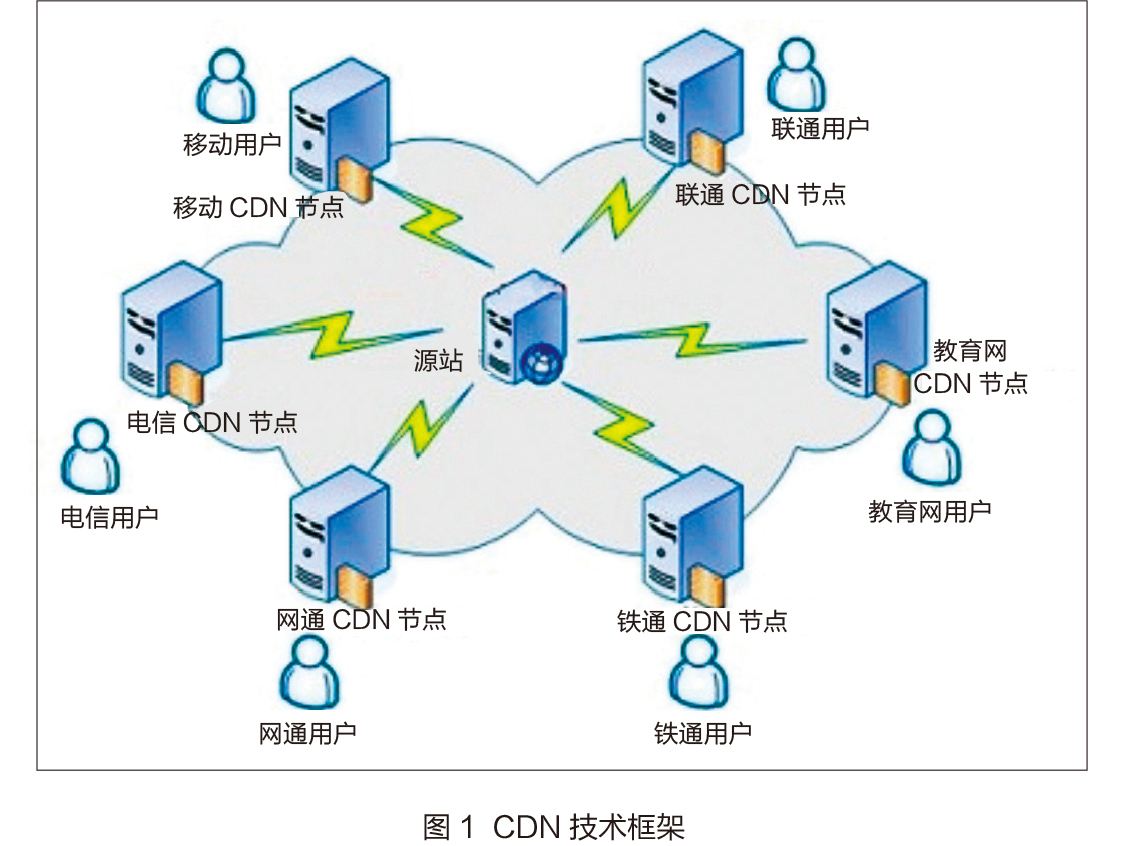
10.2 CDN #
CDN的全称是Content Delivery Network,即内容分发网络。
CDN系统能够实时地根据网络流量和各节点的连接、负载状况以及到用户的距离和响应时间等综合信息将用户的请求重新导向离用户最近的服务节点上。其目的是使用户可就近取得所需内容,解决 Internet网络拥挤的状况,提高用户访问网站的响应速度。
cdn
10.3 配置语法 #
10.3.1 sendfile #
类型
种类
语法
sendfile on / off
默认
sendfile off;
上下文
http,server,location,if in location
10.3.2 tcp_nopush #
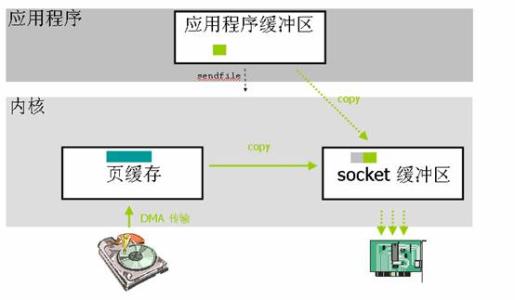
在sendfile开启的情况下,合并多个数据包,提高网络包的传输效率
类型
种类
语法
tcp_nopush on / off
默认
tcp_nopush off;
上下文
http,server,location
10.3.3 tcp_nodelay #
在keepalive连接下,提高网络包的传输实时性
类型
种类
语法
tcp_nodelay on / off
默认
tcp_nodelay on;
上下文
http,server,location
10.3.4 gzip #
类型
种类
语法
gzip on / off
默认
gzip off;
上下文
http,server,location
10.3.5 gzip_comp_level #
类型
种类
语法
gzip_comp_level level
默认
gzip_comp_level 1;
上下文
http,server,location
10.3.6 gzip_http_version #
类型
种类
语法
gzip_http_version 1.0/1.1
默认
gzip_http_version 1.1;
上下文
http,server,location
10.3.7 http_gzip-static_module #
先找磁盘上找同名的.gz这个文件是否存在,节约CPU的压缩时间和性能损耗
http_gzip_static_module 预计gzip模块http_gunzip_module 应用支持gunzip的压缩方式
类型
种类
语法
gzip_static on/off
默认
gzip_static off;
上下文
http,server,location
10.3.8 案例 #
echo color > color.html
gzip color.html
/etc/nginx/conf.d/default.conf
mkdir -p /data/www/images
mkdir -p /data/www/html
echo color > /data/ www/html/color.html
gzip /data/www/html/color.html
mkdir -p /data/www/js
mkdir -p /data/www/css
mkdir -p /data/www/download location ~ .*\.(jpg|png|gif)$ {
gzip off;#关闭压缩
root /data/www/images;
}
location ~ .*\.(html|js|css)$ {
gzip_static on;
gzip on; #启用压缩
gzip_min_length 1k; #只压缩超过1K的文件
gzip_http_version 1.1 ; #启用gzip压缩所需的HTTP 最低版本
gzip_comp_level 9 ; #压缩级别,压缩比率越高文件被压缩的体积越小
gzip_types text/css application/javascript;#进行压缩的文件类型
root /data/www/html;
}
location ~ ^/download {
gzip_static on; #启用压缩
tcp_nopush on; # 不要着急发,攒一波再发
root /data/www; # 注意此处目录是`/data/www` 而不是`/data/www/download`
} 11. 浏览器缓存 #
类型
种类
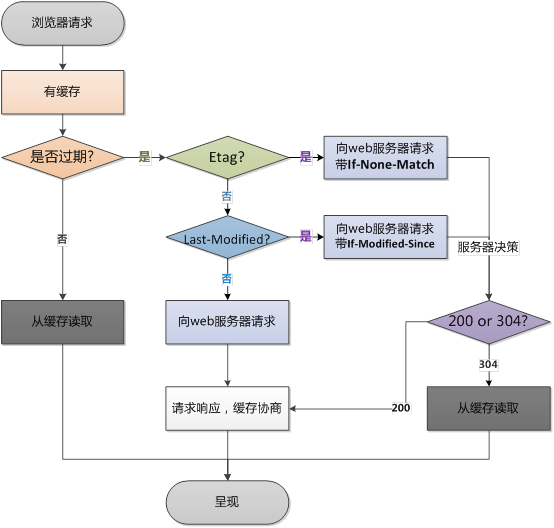
检验是否过期
Expires、Cache-Control(max-age)
Etag
Etag
Last-Modified
Last-Modified
11.1 expires #
类型
种类
语法
expires time
默认
expires off;
上下文
http,server,location
location ~ .*\.(jpg|png|gif)$ {
    expires 24h;
}
12. 跨域 #
跨域是指一个域下的文档或脚本试图去请求另一个域下的资源
类型
种类
语法
add_header name value
默认
add_header --;
上下文
http,server,location
mkdir -p /data/json
cd /data/json
vi user.json
{"name" :"zhufeng" }location ~ .*\.json$ {
add_header Access -Control -Allow -Origin http :
add_header Access -Control -Allow -Methods GET ,POST ,PUT ,DELETE ,OPTIONS ;
root /data/json;
}index.html
<!DOCTYPE HTML PUBLIC "-//W3C//DTD HTML 4.0 Transitional//EN" >
<html >
<head >
</head >
<body >
<script >
let xhr = new XMLHttpRequest ();
xhr.open ('GET' , 'http://115.29.148.6/user.json' , true );
xhr.onreadystatechange = function (if (xhr.readyState == 4 && xhr.status == 200 ) {
console .log (xhr.responseText );
}
}
xhr.send ();
</script >
</body >
</html > http-server13. 防盗链 #
防止网站资源被盗用
保证信息安全
防止流量过量
需要区别哪些请求是非正常的用户请求
使用http_refer防盗链
类型
种类
语法
valid_referers none、block、server_names、IP
默认
-
上下文
server,location
location ~ .*\.(jpg|png|gif)$ {
        expires 1h;
        gzip off;
        gzip_http_version 1.1;
        gzip_comp_level 3;
        gzip_types image/jpeg image/png image/gif;
        # none没有refer blocked非正式HTTP请求 特定IP
+       valid_referers none blocked 115.29.148.6;
+       if ($invalid_referer) { # 验证通过为0,不通过为1
+           return 403;
+       }
        root /data/images;
    }
-e, --referer Referer URL (H)
curl -v -e "115.29.148.6" http :
curl -v -e "http://www.baidu.com" http :
14. 代理服务 #
14.1 配置 #
类型
种类
语法
proxy_pass URL
默认
-
上下文
server,location
14.2 正向代理 #
正向代理的对象是客户端,服务器端看不到真正的客户端
通过公司代理服务器上网
设置本地host
C:\Windows\System32\drivers\etc
115.29 .148 .6 www.zhufengpeixun .com resolver 8.8 .8 .8 ; #谷歌的域名解析地址
location / {
# $http_host 要访问的主机名 $request_uri请求路径
proxy_pass http :
}
按Win+R系统热键打开运行窗口,输入ipconfig /flushdns命令后按回车,就可以清空电脑的DNS缓存
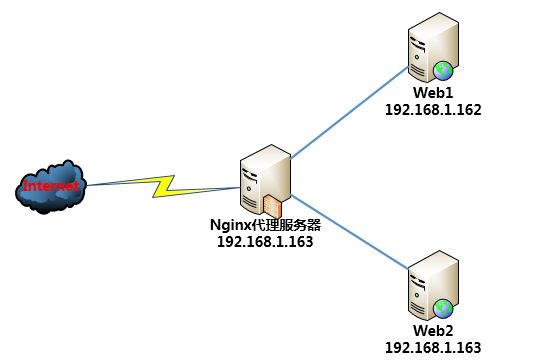
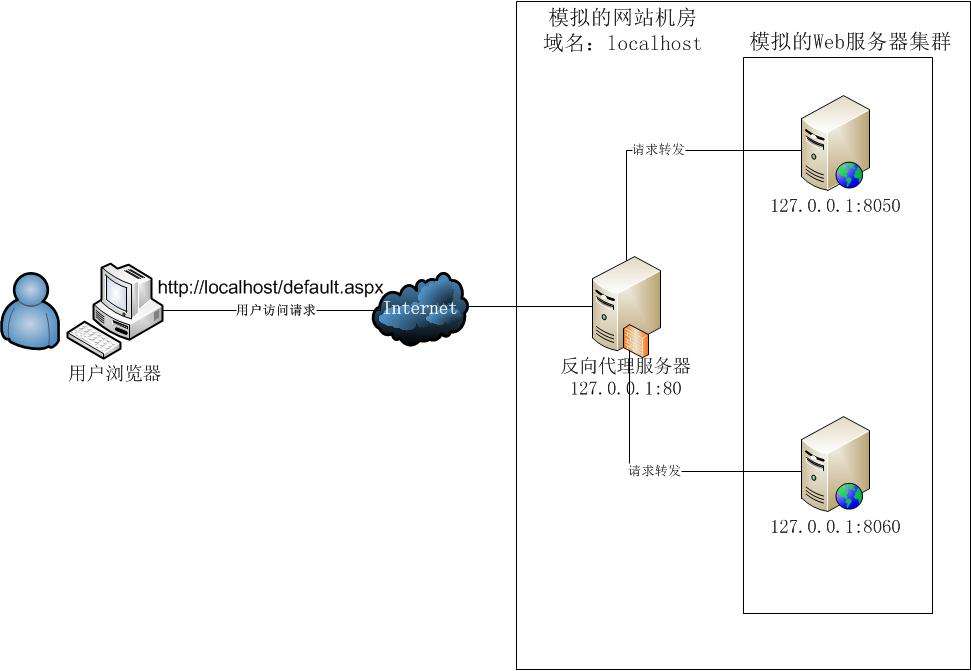
14.3 反向代理 #
反向代理的对象的服务端,客户端看不到真正的服务端
nginx代理应用服务器
location ~ ^/api {
proxy_pass http :
proxy_redirect default ; #重定向
proxy_set_header Host $http_host; #向后传递头信息
proxy_set_header X-Real -IP $remote_addr; #把真实IP 传给应用服务器
proxy_connect_timeout 30 ; #默认超时时间
proxy_send_timeout 60 ; # 发送超时
proxy_read_timeout 60 ; # 读取超时
proxy_buffering on; # 在proxy_buffering 开启的情况下,Nginx 将会尽可能的读取所有的upstream端传输的数据到buffer,直到proxy_buffers设置的所有buffer们 被写满或者数据被读取完(EOF )
proxy_buffers 4 128k; # proxy_buffers由缓冲区数量和缓冲区大小组成的。总的大小为number*size
proxy_busy_buffers_size 256k; # proxy_busy_buffers_size不是独立的空间,他是proxy_buffers和proxy_buffer_size的一部分。nginx会在没有完全读完后端响应的时候就开始向客户端传送数据,所以它会划出一部分缓冲区来专门向客户端传送数据(这部分的大小是由proxy_busy_buffers_size来控制的,建议为proxy_buffers中单个缓冲区大小的2 倍),然后它继续从后端取数据,缓冲区满了之后就写到磁盘的临时文件中。
proxy_buffer_size 32k; # 用来存储upstream端response的header
proxy_max_temp_file_size 256k; # response的内容很大的 话,Nginx 会接收并把他们写入到temp_file里去,大小由proxy_max_temp_file_size控制。如果busy的buffer 传输完了会从temp_file里面接着读数据,直到传输完毕。
}curl http :14.3.1 proxy_pass #
location /a/ {
proxy_pass http :
}
请求http :
如果proxy_pass的URL定向里不包括URI,那么请求中的URI会保持原样传送给后端server,如果没有/,表示相对路径
proxy_pass后的url最后没有/就是相对路径,location中匹配的路径部分会走代理,也就是说会保留
location /a/ {
proxy_pass http :
}
请求http :15 负载均衡 #
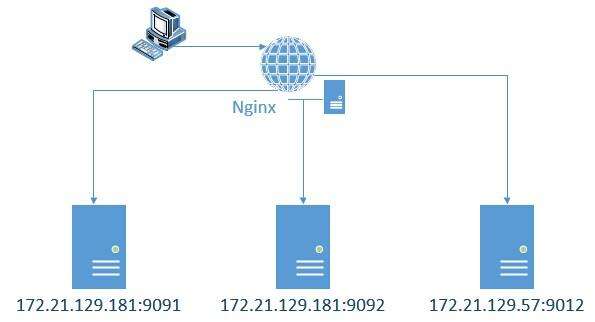
使用集群是网站解决高并发、海量数据问题的常用手段。
当一台服务器的处理能力、存储空间不足时,不要企图去换更强大的服务器,对大型网站而言,不管多么强大的服务器,都满足不了网站持续增长的业务需求。
这种情况下,更恰当的做法是增加一台服务器分担原有服务器的访问及存储压力。通过负载均衡调度服务器,将来自浏览器的访问请求分发到应用服务器集群中的任何一台服务器上,如果有更多的用户,就在集群中加入更多的应用服务器,使应用服务器的负载压力不再成为整个网站的瓶颈。
15.1 upstream #
nginx把请求转发到后台的一组upstream服务池
类型
种类
语法
upstream name {}
默认
-
上下文
http
var http = require ( 'http' );
var server =http.createServer ( function ( request ,response ){
response.end ('server3 000' );
} );
server.listen ( 3000 ,function (console .log ( 'HTTP服务器启动中,端口:3000' );
});upstream zhufeng {
server 127.0 .0 .1 :3000 weight=10 ;
server 127.0 .0 .1 :4000 ;
server 127.0 .0 .1 :5000 ;
}
server {
location / {
proxy_pass http :
}15.2 后端服务器调试状态 #
状态
描述
down
当前的服务器不参与负载均衡
backup
当其它节点都无法使用时的备份的服务器
max_fails
允许请求失败的次数,到达最大次数就会休眠
fail_timeout
经过max_fails失败后,服务暂停的时间,默认10秒
max_conns
限制每个server最大的接收的连接数,性能高的服务器可以连接数多一些
upstream zfpx {
server localhost :3000 down;
server localhost :4000 backup;
server localhost :5000 max_fails=1 fail_timeout=10s;
}15.3 分配方式 #
类型
种类
轮询(默认)
每个请求按时间顺序逐一分配到不同的后端服务器,如果后端服务器down掉,能自动剔除
weight(加权轮询)
指定轮询几率,weight和访问比率成正比,用于后端服务器性能不均的情况
ip_hash
每个请求按访问ip的hash结果分配,这样每个访客固定访问一个后端服务器,可以解决session的问题
least_conn
哪个机器上连接数少就分发给谁
url_hash(第三方)
按访问的URL地址来分配 请求,每个URL都定向到同一个后端 服务器上(缓存)
fair(第三方)
按后端服务器的响应时间来分配请求,响应时间短的优先分配
正定义hash
hash自定义key
upstream zhufeng{
ip_hash;
server 127.0 .0 .1 :3000 ;
}upstream zhufeng{
least_conn;
server 127.0 .0 .1 :3000 ;
}upstream zhufeng{
url_hash;
server 127.0 .0 .1 :3000 ;
}upstream zhufeng{
fair;
server 127.0 .0 .1 :3000 ;
}upstream zhufeng{
hash $request_uri;
server 127.0 .0 .1 :3000 ;
}16. 缓存 #
proxy_cache
http{
# 缓存路径 目录层级 缓存空间名称和大小 失效时间为7 天 最大容量为10g
proxy_cache_path /data/nginx/cache levels=1 :2 keys_zone=cache :100m inactive=60m max_size=10g;
}
键值
含义
proxy_cache_path
缓存文件路径
levels
设置缓存文件目录层次;levels=1:2 表示两级目录
keys_zone
设置缓存名字和共享内存大小
inactive
在指定时间内没人访问则被删除
max_size
最大缓存空间,如果缓存空间满,默认覆盖掉缓存时间最长的资源
if ($request_uri ~ ^/cache/ (login|logout)) {
set $nocache 1 ;
}
location / {
proxy_pass http :
}
location ~ ^/cache/ {
proxy_cache cache;
proxy_cache_valid 200 206 304 301 302 60m; # 对哪些状态码缓存,过期时间为60 分钟
proxy_cache_key $uri; #缓存的维度
proxy_no_cache $nocache;
proxy_set_header Host $host :$server_port; #设置头
proxy_set_header X-Real -IP $remote_addr; #设置头
proxy_set_header X-Forwarded -For $proxy_add_x_forwarded_for; #设置头
proxy_pass http :
}
键值
含义
proxy_cache
使用名为cache的对应缓存配置
proxy_cache_valid 200 206 304 301 302 10d;
对httpcode为200的缓存10天
proxy_cache_key $uri
定义缓存唯一key,通过唯一key来进行hash存取
proxy_set_header
自定义http header头,用于发送给后端真实服务器
proxy_pass
指代理后转发的路径,注意是否需要最后的/
17 location #
17.1 正则表达式 #
类型
种类
.
匹配除换行符之外的任意字符
?
重复0次或1次
+
重复1次或更多次
*
重复零次或多次
^
匹配字符串的开始
$
匹配字符串的结束
{n}
重复n次
{n,}
重复n次或更多次
[abc]
匹配单个字符a或者b或者c
a-z
匹配a-z小写字母的任意一个
\
转义字符
()
用于匹配括号之间的内容,可以通过$1、$2引用
\w
的释义都是指包含大 小写字母数字和下划线 相当于([0-9a-zA-Z])
17.2 语法规则 #
location仅匹配URI,忽略参数
前缀字符串
常规
= 精确匹配
^~ 匹配上后则不再进行正则表达式的匹配
正则表达式
~ 大小写敏感的正则表达式匹配
~*忽略大小写的正则表达式匹配
内部调转
Syntax location [=|~|~*|^~] uri {...}
       location @name{...}
default -
Context server,location
17.3 匹配规则 #
等号类型(=)的优先级最高。一旦匹配成功,则不再查找其他匹配项。
^~类型表达式。一旦匹配成功,则不再查找其他匹配项。
正则表达式类型(~ ~*)的优先级次之。如果有多个location的正则能匹配的话,则使用正则表达式最长的那个。
常规字符串匹配类型按前缀匹配
17.4 案例 #
location ~ /T1/ $ {
return 200 '匹配到第一个正则表达式' ;
}
location ~* /T1/ (\w+)$ {
return 200 '匹配到最长的正则表达式' ;
}
location ^~ /T1/ {
return 200 '停止后续的正则表达式匹配' ;
}
location /T1 /T2 {
return 200 '最长的前缀表达式匹配' ;
}
location /T1 {
return 200 '前缀表达式匹配' ;
}
location = /T1 {
return 200 '精确匹配' ;
}/T1
/T1 /
/T1/ T2
/T1 /T2 /
/t1/ T2 18. rewrite #
syntax : rewrite regex replacement [flag]
Default : —
Context : server, location, if
如果正则表达式(regex)匹配到了请求的URI(request URI),这个URI会被后面的replacement替换
rewrite的定向会根据他们在配置文件中出现的顺序依次执行
通过使用flag可以终止定向后进一步的处理
rewrite ^/users/ (.*)$ /show?user=$1? last;=18.1 用途 #
URL页面跳转
兼容旧版本
SEO优化(伪静态)
维护(后台维护、流量转发)
安全(伪静态)
18.2 语法 #
类型
种类
语法
rewrite regex replacement [flag]
默认
-
上下文
server,location,if
regex 正则表达式指的是要被改写的路径
replacement 目标要替换成哪个URL
flag 标识
实例
rewrite ^(.*)$ /www/reparing.html break ;18.3 flag #
flag
含义
last
先匹配自己的location,然后通过rewrite规则新建一个请求再次请求服务端
break
先匹配自己的location,然后生命周期会在当前的location结束,不再进行后续的匹配
redirect
返回302昨时重定向,以后还会请求这个服务器
permanent
返回301永久重定向,以后会直接请求永久重定向后的域名
18.3.1 last #
结束当前的请求处理,用替换后的URI重新匹配location
可理解为重写(rewrite)后,发起了一个新请求,进入server模块,匹配location
如果重新匹配循环的次数超过10次,nginx会返回500错误
返回302 http状态码
浏览器地址栏显示重定向后的url
18.3.2 break #
结束当前的请求处理,使用当前资源,不再执行location里余下的语句
返回302 http状态码
浏览器地址栏显示重定向后的url
18.3.3 redirect #
临时跳转,返回302 http状态码
浏览器地址栏显示重地向后的url
18.3.4 permanent #
永久跳转,返回301 http状态码;
浏览器地址栏显示重定向后的url
location ~ ^/break {
rewrite ^/break / test break ;
root /data/html;
}
location ~ ^/last {
rewrite ^/last / test last;
}
location /test {
default_type application/json;
return 200 '{"code":0,"msg":"success"}' ;
}
location ~ ^/redirect {
rewrite ^/redirect http:/ /www.baidu .com redirect;
}
location ~ ^/permanent {
rewrite ^/permanent http:/ /www.baidu .com permanent;
}curl http :
test
curl http :
{"code" :0 ,"msg" :"success" }
curl -vL http :
curl -vL http :