1.什么是GraphQL #
- graphql 既是一种用于 API 的查询语言也是一个满足你数据查询的运行时
GraphQL对你的 API 中的数据提供了一套易于理解的完整描述,使得客户端能够准确地获得它需要的数据,而且没有任何冗余- 请求你所要的数据不多不少
- 只用一个请求获取多个资源
2.创建后端项目 #
mkdir server
cd server
cnpm init -y
cnpm i express graphql express-graphql mongoose  cors --save
3. 实现商品分类接口 #
3.1 server.js #
server.js
const express = require('express');
const graphqlHTTP = require('express-graphql');
const schema = require('./schema');
const cors = require('cors');
const app = express();
app.use(cors({
    origin: 'http://localhost:3000',
    methods: "GET,PUT,POST,OPTIONS"
}));
app.use('/graphql', graphqlHTTP({
    schema,
    graphiql: true
}));
app.listen(4000, () => {
    console.log('server started on 4000');
});
3.2 schema.js #
- 定义用户自定义类型,类型的每个字段都必须是已定义的且最终都是 GraphQL 中定义的类型。
- 定义根类型,每种根类型中包含了准备暴露给服务调用方的用户自定义类型
- 定义 Schema,每一个 Schema 中允许出现三种根类型:query,mutation,subscription,其中至少要有 query
schema.js
const graphql = require('graphql');
const { GraphQLObjectType,
    GraphQLString,
    GraphQLInt,
    GraphQLSchema,
    GraphQLList,
    GraphQLNonNull
} = graphql;
const categories = [
    { id: '1', name: '图书' },
    { id: '2', name: '数码' },
    { id: '3', name: '食品' }
]

const Category = new GraphQLObjectType({
    name: 'Category',
    fields: () => (
        {
            id: { type: GraphQLString },
            name: { type: GraphQLString },
        }
    )
});

const RootQuery = new GraphQLObjectType({
    name: 'RootQuery',
    fields: {
        getCategory: {
            type: Category,
            args: {
                id: {
                    type: GraphQLString
                }
            },
            resolve(parent, args) {
                return categories.find(item => item.id === args.id);
            }
        }
    }
});
module.exports = new GraphQLSchema({
    query: RootQuery
})
3.3 GraphiQL #
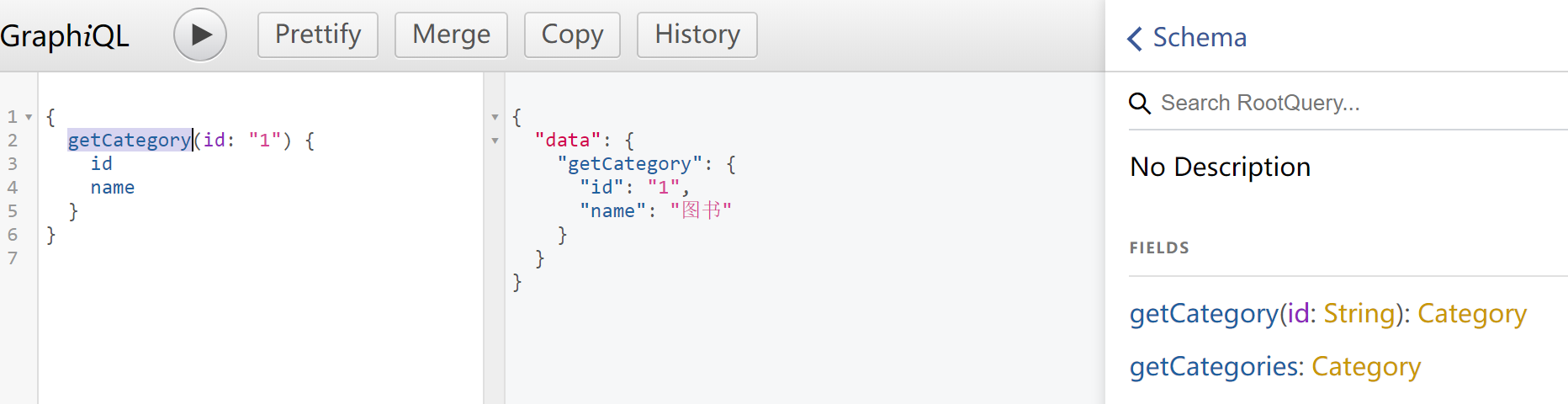
- GraphiQLis an in-browser tool for writing, validating, and testing GraphQL queries.
每次调用
GraphQL服务,需要明确指定调用Schema中的哪个根类型(默认是query)- 然后指定这个根类型下的哪几个字段(每个字段对应一个用户自定义类型),然后指定这些字段中的那些子字段的哪几个。一直到所有的字段都没有子字段为止
- Schema 明确了服务端有哪些字段(用户自定义类型)可以用,每个字段的类型和子字段
- 每次查询时,服务器就会根据
Schema验证并执行查询
     {
       field(arg: "value") {
         subField
       }
     }
query{
getCategory(id: "1") {
id
name
}
}
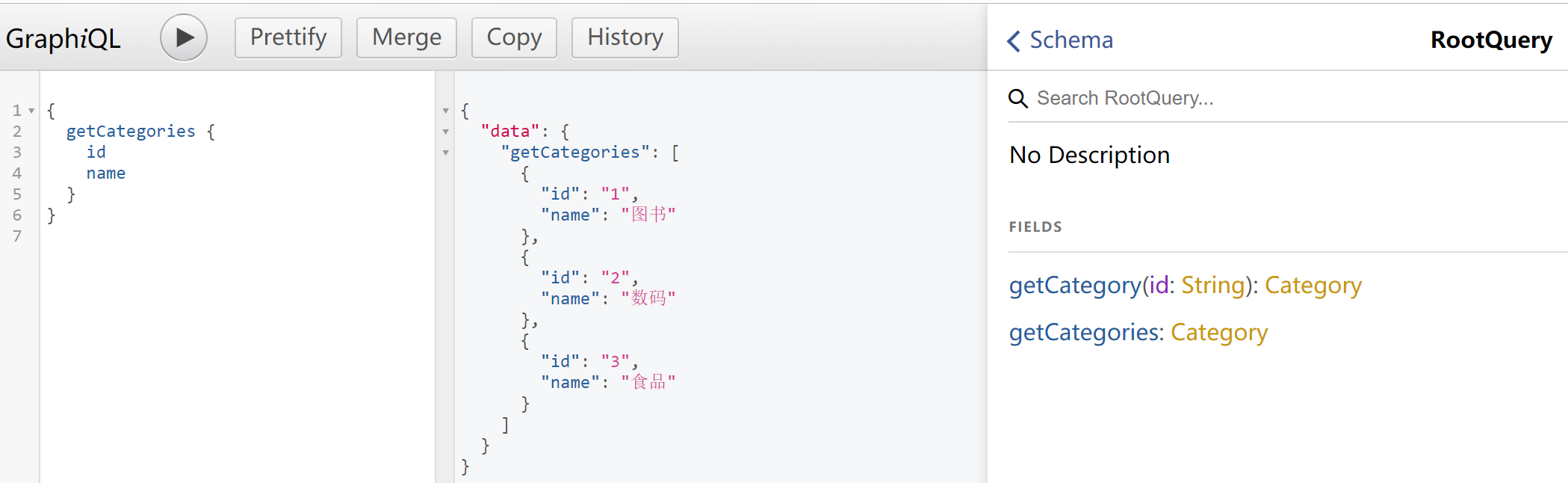
4. 实现商品接口 #
4.1 schema.js #
schema.js
const graphql = require('graphql');
const { GraphQLObjectType,
    GraphQLString,
    GraphQLSchema,
    GraphQLList,
} = graphql;
const categories = [
    { id: '1', name: '图书' },
    { id: '2', name: '数码' },
    { id: '3', name: '食品' }
]
+const products = [
+    { id: '1', name: '红楼梦', category: '1' },
+    { id: '2', name: '西游记', category: '1' },
+    { id: '3', name: '水浒传', category: '1' },
+    { id: '4', name: '三国演义', category: '1' },
+    { id: '2', name: 'iPhone', category: '2' },
+    { id: '3', name: '', category: '3' }
+]
//定义用户自定义类型
//类型的每个字段都必须是已定义的且最终都是 GraphQL 中定义的类型。
const Category = new GraphQLObjectType({
    name: 'Category',
    fields: () => (
        {
            id: { type: GraphQLString },
            name: { type: GraphQLString },
+            products: {
+                type: new GraphQLList(Product),
+                resolve(parent) {
+                    return products.filter(item => item.category === parent.id);
+                }
+            }
        }
    )
});
+const Product = new GraphQLObjectType({
+    name: 'Product',
+    fields: () => (
+        {
+            id: { type: GraphQLString },
+            name: { type: GraphQLString },
+            category: {
+                type: Category,
+                resolve(parent) {
+                    return categories.find(item => item.id === parent.category);
+                }
+            }
+        }
+    )
+});

const RootQuery = new GraphQLObjectType({
    name: 'RootQuery',
    fields: {
        getCategory: {
            type: Category,
            args: {
                id: {
                    type: GraphQLString
                }
            },
            resolve(parent, args) {
                return categories.find(item => item.id === args.id);
            }
        },
        getCategories: {
            type: new GraphQLList(Category),
            args: {

            },
            resolve(parent, args) {
                return categories;
            }
        },
+        getProduct: {
+            type: Product,
+            args: {
+                id: {
+                    type: GraphQLString
+                }
+            },
+            resolve(parent, args) {
+                return products.find(item => item.id === args.id);
+            }
+        },
+        getProducts: {
+            type: new GraphQLList(Product),
+            args: {},
+            resolve(parent, args) {
+                return categories;
+            }
+        }
    }
});
//定义 Schema,每一个 Schema 中允许出现三种根类型:query,mutation,subscription,其中至少要有 query
module.exports = new GraphQLSchema({
    query: RootQuery
})
5. 添加商品 #
5.1 schema.js #
schema.js
const graphql = require('graphql');
const {
    GraphQLObjectType,
    GraphQLString,
    GraphQLSchema,
    GraphQLList,
    GraphQLNonNull
} = graphql;
const categories = [
    { id: '1', name: '图书' },
    { id: '2', name: '数码' },
    { id: '3', name: '食品' }
]
+const products = [
+    { id: '1', name: '红楼梦', category: '1' },
+    { id: '2', name: '西游记', category: '1' },
+    { id: '3', name: '水浒传', category: '1' },
+    { id: '4', name: '三国演义', category: '1' },
+    { id: '2', name: 'iPhone', category: '2' },
+    { id: '3', name: '', category: '3' }
+]
//定义用户自定义类型
//类型的每个字段都必须是已定义的且最终都是 GraphQL 中定义的类型。
const Category = new GraphQLObjectType({
    name: 'Category',
    fields: () => (+
        {
            id: { type: GraphQLString },
            name: { type: GraphQLString },
            products: {
                type: new GraphQLList(Product),
                resolve(parent) {
                    return products.filter(item => item.category === parent.id);
                }
            }
        }
    )
});
+const Product = new GraphQLObjectType({
+    name: 'Product',
+    fields: () => (
+        {
+            id: { type: GraphQLString },
+            name: { type: GraphQLString },
+            category: {
+                type: Category,
+                resolve(parent) {
+                    return categories.find(item => item.id === parent.category);
+                }
+            }
+        }
+    )
+});

const RootQuery = new GraphQLObjectType({
    name: 'RootQuery',
    fields: {
        getCategory: {
            type: Category,
            args: {
                id: {
                    type: GraphQLString
                }
            },
            resolve(parent, args) {
                return categories.find(item => item.id === args.id);
            }
        },
        getCategories: {
            type: new GraphQLList(Category),
            args: {

            },
            resolve(parent, args) {
                return categories;
            }
        },
        getProduct: {
            type: Product,
            args: {
                id: {
                    type: GraphQLString
                }
            },
            resolve(parent, args) {
                return products.find(item => item.id === args.id);
            }
        },
        getProducts: {
            type: new GraphQLList(Product),
            args: {

            },
            resolve(parent, args) {
                return categories;
            }
        }
    }
});
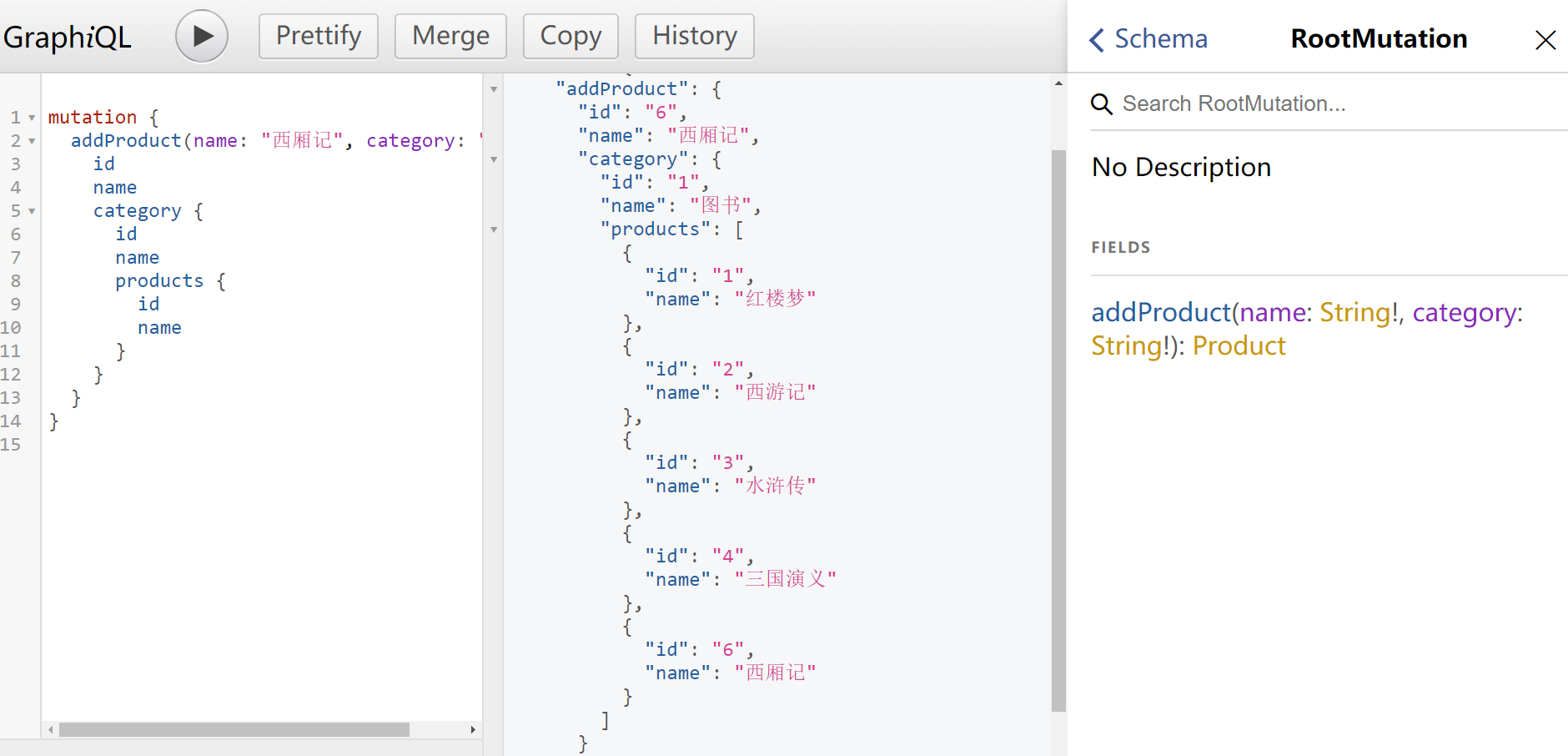
+const RootMutation = new GraphQLObjectType({
+    name: 'RootMutation',
+    fields: {
+        addCategory: {
+            type: Category,
+            args: {
+                name: { type: new GraphQLNonNull(GraphQLString) }
+            },
+            resolve(parent, args) {
+                args.id = categories.length + 1 + '';
+                categories.push(args);
+                return args;
+            }
+        },
+        addProduct: {
+            type: Product,
+            args: {
+                name: { type: new GraphQLNonNull(GraphQLString) },
+                category: { type: new GraphQLNonNull(GraphQLString) }
+            },
+            resolve(parent, args) {
+                args.id = products.length + 1 + '';
+                products.push(args);
+                return args;
+            }
+        }
    }
});
//定义 Schema,每一个 Schema 中允许出现三种根类型:query,mutation,subscription,其中至少要有 query
module.exports = new GraphQLSchema({
    query: RootQuery,
+    mutation: RootMutation
})
6. 使用mongodb数据库 #
6.1 model.js #
const mongoose = require('mongoose');
const ObjectId = mongoose.Schema.Types.ObjectId;
const Schema = mongoose.Schema;
const conn = mongoose.createConnection(`mongodb://localhost/graphql`, {
    useNewUrlParser: true, useUnifiedTopology: true
});
conn.on('open', () => console.log('数据库连接成功'));
conn.on('error', (error) => console.log('数据库连接失败', error));

const CategorySchema = new Schema({
    name: String
});
const CategoryModel = conn.model('Category', CategorySchema);
const ProductSchema = new Schema({
    name: String,
    category: {
        type: ObjectId,
        ref: 'Category'
    }
});
const ProductModel = conn.model('Product', ProductSchema);
module.exports = {
    CategoryModel,
    ProductModel
}
6.2 schema.js #
schema.js
const graphql = require('graphql');
+const { CategoryModel, ProductModel } = require('./model');
const {
    GraphQLObjectType,
    GraphQLString,
    GraphQLSchema,
    GraphQLList,
    GraphQLNonNull
} = graphql;
const categories = [
    { id: '1', name: '图书' },
    { id: '2', name: '数码' },
    { id: '3', name: '食品' }
]
const products = [
    { id: '1', name: '红楼梦', category: '1' },
    { id: '2', name: '西游记', category: '1' },
    { id: '3', name: '水浒传', category: '1' },
    { id: '4', name: '三国演义', category: '1' },
    { id: '2', name: 'iPhone', category: '2' },
    { id: '3', name: '', category: '3' }
]
//定义用户自定义类型
//类型的每个字段都必须是已定义的且最终都是 GraphQL 中定义的类型。
const Category = new GraphQLObjectType({
    name: 'Category',
    fields: () => (
        {
            id: { type: GraphQLString },
            name: { type: GraphQLString },
            products: {
                type: new GraphQLList(Product),
                resolve(parent) {
                    //return products.filter(item => item.category === parent.id);
+                    return ProductModel.find({ category: parent.id });
                }
            }
        }
    )
});
const Product = new GraphQLObjectType({
    name: 'Product',
    fields: () => (
        {
            id: { type: GraphQLString },
            name: { type: GraphQLString },
            category: {
                type: Category,
                resolve(parent) {
                    //return categories.find(item => item.id === parent.category);
+                    return CategoryModel.findById(parent.category);
                }
            }
        }
    )
});

const RootQuery = new GraphQLObjectType({
    name: 'RootQuery',
    fields: {
        getCategory: {
            type: Category,
            args: {
                id: {
                    type: GraphQLString
                }
            },
            resolve(parent, args) {
                //return categories.find(item => item.id === args.id);
+                return CategoryModel.findById(args.id);
            }
        },
        getCategories: {
            type: new GraphQLList(Category),
            args: {},
            resolve(parent, args) {
                //return categories;
+                return CategoryModel.find();
            }
        },
        getProduct: {
            type: Product,
            args: {
                id: { type: GraphQLString }
            },
            resolve(parent, args) {
                //return products.find(item => item.id === args.id);
+                return ProductModel.findById(args.id);
            }
        },
        getProducts: {
            type: new GraphQLList(Product),
            args: {

            },
            resolve(parent, args) {
                //return categories;
+                return ProductModel.find();
            }
        }
    }
});
const RootMutation = new GraphQLObjectType({
    name: 'RootMutation',
    fields: {
        addCategory: {
            type: Category,
            args: {
                name: { type: new GraphQLNonNull(GraphQLString) }
            },
            resolve(parent, args) {
                /*
                  args.id = categories.length + 1 + '';
                  categories.push(args);
                  return args;
                */
+                return CategoryModel.create(args);
            }
        },
        addProduct: {
            type: Product,
            args: {
                name: { type: new GraphQLNonNull(GraphQLString) },
                category: { type: new GraphQLNonNull(GraphQLString) }
            },
            resolve(parent, args) {
                /* args.id = products.length + 1 + '';
                products.push(args);
                return args; */
+                return ProductModel.create(args);
            }
        }
    }
});
//定义 Schema,每一个 Schema 中允许出现三种根类型:query,mutation,subscription,其中至少要有 query
module.exports = new GraphQLSchema({
    query: RootQuery,
    mutation: RootMutation
})
6.3 操作步骤 #
mutation{
  addCategory(name:"书籍"){
    id,
    name
  }
}
{
  "data": {
    "addCategory": {
      "id": "5dcfb188fe2d74a3543392ab",
      "name": "书籍"
    }
  }
}
mutation{
  addCategory(name:"数码产品"){
    id,
    name
  }
}
{
  "data": {
    "addCategory": {
      "id": "5dcfb1bdfe2d74a3543392ad",
      "name": "数码产品"
    }
  }
}
mutation{
  addCategory(name:"食品"){
    id,
    name
  }
}
{
  "data": {
    "addCategory": {
      "id": "5dcfb1c5fe2d74a3543392ae",
      "name": "食品"
    }
  }
}


{
  getCategories {
    id
    name
  }
}

{
  "data": {
    "getCategories": [
      {
        "id": "5dcfb188fe2d74a3543392ab",
        "name": "书籍"
      },
      {
        "id": "5dcfb1bdfe2d74a3543392ad",
        "name": "数码产品"
      },
      {
        "id": "5dcfb1c5fe2d74a3543392ae",
        "name": "食品"
      }
    ]
  }
}


mutation {
  addProduct(name: "西游记", category: "5dcfb188fe2d74a3543392ab") {
    id
    name
  }
}

{
  "data": {
    "addProduct": {
      "id": "5dcfb341b2f03ea4906dd913",
      "name": "西游记"
    }
  }
}

mutation {
  addProduct(name: "红楼梦", category: "5dcfb188fe2d74a3543392ab") {
    id
    name
  }
}

{
  "data": {
    "addProduct": {
      "id": "5dcfb354b2f03ea4906dd914",
      "name": "红楼梦"
    }
  }
}

mutation {
  addProduct(name: "水浒传", category: "5dcfb188fe2d74a3543392ab") {
    id
    name
  }
}

{
  "data": {
    "addProduct": {
      "id": "5dcfb36cb2f03ea4906dd915",
      "name": "水浒传"
    }
  }
}

mutation {
  addProduct(name: "三国演义", category: "5dcfb188fe2d74a3543392ab") {
    id
    name
  }
}


{
  "data": {
    "addProduct": {
      "id": "5dcfb37bb2f03ea4906dd916",
      "name": "三国演义"
    }
  }
}

mutation {
  addProduct(name: "iPhone", category: "5dcfb1bdfe2d74a3543392ad") {
    id
    name
  }
}

{
  "data": {
    "addProduct": {
      "id": "5dcfb393b2f03ea4906dd917",
      "name": "iPhone"
    }
  }
}


mutation {
  addProduct(name: "面包", category: "5dcfb1c5fe2d74a3543392ae") {
    id
    name
  }
}

{
  "data": {
    "addProduct": {
      "id": "5dcfb3a7b2f03ea4906dd918",
      "name": "面包"
    }
  }
}


{
  getProducts {
    id
    name
  }
}

{
  "data": {
    "getProducts": [
      {
        "id": "5dcfb341b2f03ea4906dd913",
        "name": "西游记"
      },
      {
        "id": "5dcfb354b2f03ea4906dd914",
        "name": "红楼梦"
      },
      {
        "id": "5dcfb36cb2f03ea4906dd915",
        "name": "水浒传"
      },
      {
        "id": "5dcfb37bb2f03ea4906dd916",
        "name": "三国演义"
      },
      {
        "id": "5dcfb393b2f03ea4906dd917",
        "name": "iPhone"
      },
      {
        "id": "5dcfb3a7b2f03ea4906dd918",
        "name": "面包"
      }
    ]
  }
}
1.生成项目 #
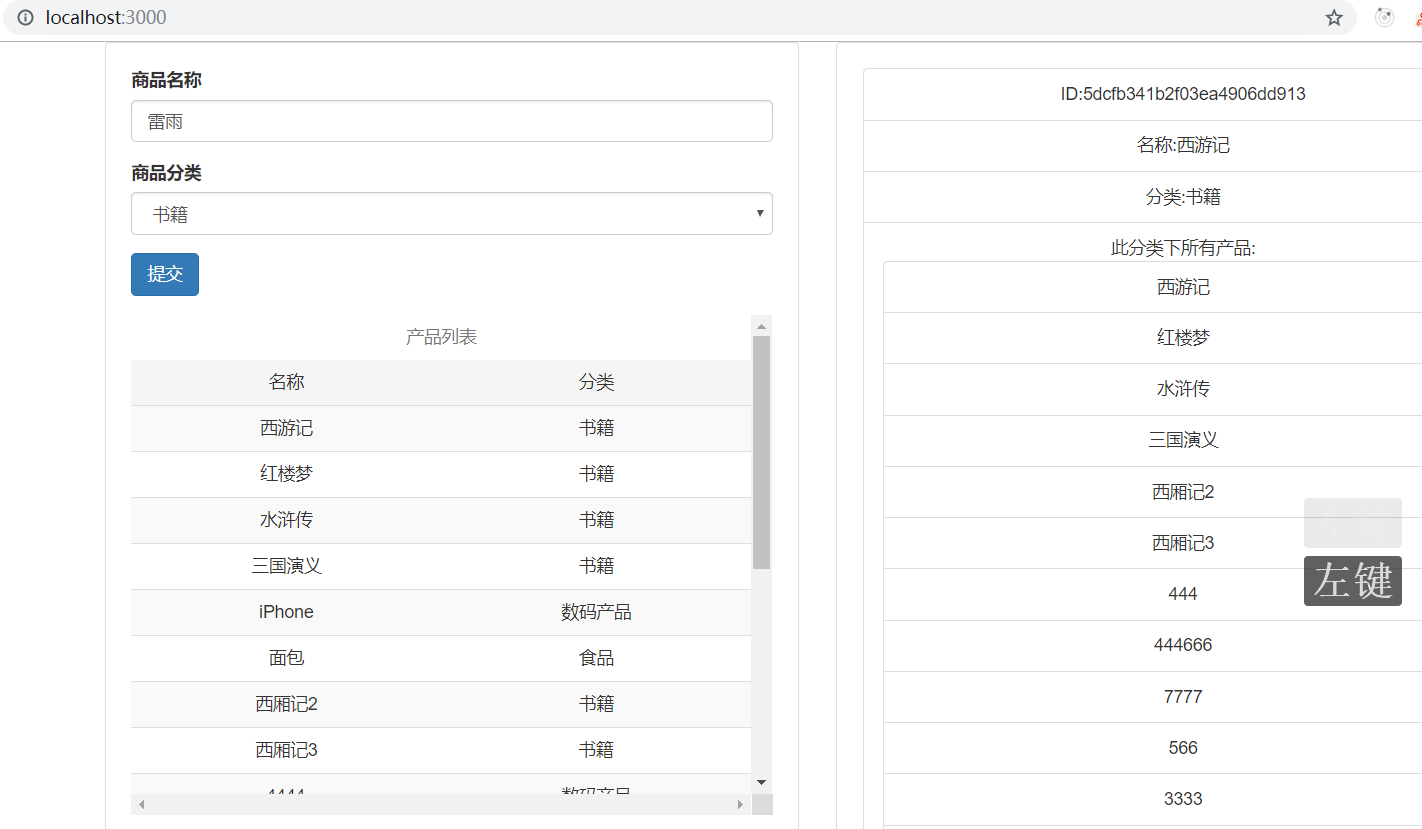
create-react-app client --typescript
cd client
cnpm start
2.安装依赖 #
cnpm install apollo-boost @apollo/react-hooks graphql --save
cnpm i bootstrap@3 --save| 模块名 | 含义 |
|---|---|
| apollo-boost | Package containing everything you need to set up Apollo Client |
| @apollo/react-hooks | React hooks based view layer integration |
| graphql | Also parses your GraphQL queries |
3.连接接口 #
3.1 src\index.tsx #
src\index.tsx
import React from 'react';
import ReactDOM from 'react-dom';
import ApolloClient from 'apollo-boost';
import { gql } from "apollo-boost";
const client = new ApolloClient({
    uri: 'http://localhost:4000/graphql',
});

client.query({
    query: gql`
      query{
        getCategories {
          id
          name
        }
      }
    `
}).then(result => console.log(result));
4.实现前台功能 #
4.1 src\App.tsx #
import React from 'react';
import ReactDOM from 'react-dom';
import ApolloClient from 'apollo-boost';
import { ApolloProvider } from '@apollo/react-hooks';
import 'bootstrap/dist/css/bootstrap.css';
import App from './App';
const client = new ApolloClient({ uri: 'http://localhost:4000/graphql' });
ReactDOM.render(<ApolloProvider client={client}>
    <App />
</ApolloProvider>, document.getElementById('root'));
4.2 src\App.tsx #
src\App.tsx
import React, { useState } from 'react';
import { CATEGORIES_PRODUCTS } from './query';
import { useQuery } from '@apollo/react-hooks';
import AddProduct from './AddProduct';
import ProductList from './ProductList';
import ProductDetail from './ProductDetail';
import { Product } from './types';
function App() {
    const [product, setProduct] = useState<Product>();
    const { loading, error, data } = useQuery(CATEGORIES_PRODUCTS);
    if (loading) {
        return <p>加载中...</p>;
    }
    if (error) {
        return <p>加载错误</p>;
    }
    let { getCategories, getProducts } = data;
    return (
        <div className="container">
            <div className="row" >
                <div className="col-md-6" >
                    <div className="panel panel-default" style={{ padding: 20 }}>
                        <div className="panel-header">
                            <AddProduct getCategories={getCategories} />
                        </div>
                        <div className="text-center" style={{ height: '400px', overflow: 'scroll' }}>
                            <ProductList getProducts={getProducts} setProduct={setProduct} />
                        </div>
                    </div>
                </div>
                <div className="col-md-6" >
                    <div className="panel panel-default" style={{ padding: 20 }}>
                        <div className="text-center">
                            <ProductDetail product={product} />
                        </div>
                    </div>
                </div>
            </div>
        </div>
    )
}
export default App;
4.3 src\types.tsx #
src\types.tsx
export interface Category {
    id?: string;
    name?: string;
}
export interface Product {
    id?: string;
    name?: string;
    categoryId?: string;
    category?: Category;
}
4.4 src\query.tsx #
src\query.tsx
import { gql } from 'apollo-boost';
export const CATEGORIES_PRODUCTS = gql`
query{
    getCategories {
      id,
      name,
      products{
        id,
        name,
      }
    }
    getProducts {
      id
      name,
      category{
        id,
        name,
        products{
          id,
          name,
        }
      }
    }
}
`;
export const CATEGORIES = gql`
query{
    getCategories {
      id
      name
    }
}
`;
export const PRODUCTS = gql`
query{
    getProducts {
      id
      name,
      category{
        id,
        name
      }
    }
}
`;
export const ADD_PRODUCT = gql`
mutation($name:String!,$categoryId: String!){
  addProduct(name: $name,category:$categoryId) {
    id,
    name,
    category{
      id,
      name
    }
  }
}
`;
4.5 src\AddProduct.tsx #
src\AddProduct.tsx
import React, { useState } from 'react';
import { Category, Product } from './types';
import { PRODUCTS, ADD_PRODUCT } from './query';
import { useMutation } from '@apollo/react-hooks';
function AddProduct(props: any) {
    const [product, setProduct] = useState<Product>({ name: '', categoryId: props.getCategories[0].id });
    const [addProduct] = useMutation(ADD_PRODUCT);
    function handleSubmit(event: React.FormEvent<HTMLFormElement>) {
        event.preventDefault();
        addProduct({ variables: product, refetchQueries: [{ query: PRODUCTS }] });
    }
    return (
        <form onSubmit={handleSubmit}>
            <div className="form-group">
                <label htmlFor="product_name">商品名称</label>
                <input onChange={(event: React.ChangeEvent<HTMLInputElement>) => setProduct({ ...product, name: event.target.value })}
                    className="form-control" id="product_name" placeholder="商品名称" />
            </div>
            <div className="form-group">
                <label htmlFor="categoryId">商品分类</label>
                <select onChange={(event: React.ChangeEvent<HTMLSelectElement>) => setProduct({ ...product, categoryId: event.target.value })}
                    className="form-control" id="categoryId">
                    <option>请选择分类</option>
                    {
                        props.getCategories.map((category: Category) => {
                            return (
                                <option key={category.id} value={category.id}>{category.name}</option>
                            )
                        })
                    }
                </select>
            </div>
            <div className="form-group">
                <input className="btn btn-primary" type="submit" />
            </div>
        </form>
    )
}
export default AddProduct;
4.6 ProductList.tsx #
src\ProductList.tsx
import React from 'react';
import { Product } from './types';
function ProductList(props: any) {
    return (
        <table className="table table-striped">
            <caption className="text-center">产品列表</caption>
            <thead>
                <tr className="active">
                    <td>名称</td><td>分类</td>
                </tr>
            </thead>
            <tbody>
                {
                    props.getProducts.map((product: Product, index: number) => (
                        <tr key={product.id} onClick={() => props.setProduct(product)}>
                            <td>{product.name}</td><td>{product.category!.name}</td>
                        </tr>
                    ))
                }
            </tbody>
        </table>
    )
}
export default ProductList;
4.7 ProductDetail.tsx #
src\ProductDetail.tsx
import React from 'react';
import { Product } from './types';
function ProductDetail(props: any) {
    console.log(props.product);

    if (!props.product)
        return null;
    return (
        <ul className="list-group">
            <li className="list-group-item">
                ID:{props.product.id}
            </li>
            <li className="list-group-item">
                名称:{props.product.name}
            </li>
            <li className="list-group-item">
                分类:{props.product.category.name}
            </li>
            <li className="list-group-item">
                此分类下所有产品:
                <ul className="list-group">
                    {
                        props.product.category.products.map((product: Product, index: number) => (
                            <li key={product.id} className="list-group-item">{product.name}</li>
                        ))
                    }
                </ul>
            </li>
        </ul>
    )
}
export default ProductDetail;