1. koa #
koajs Koa2是现在最流行的基于Node.js平台的web开发框架
2.安装 #
npm i koa2.应用程序 #
Koa 应用程序是一个包含一组中间件函数的对象,它是按照类似堆栈的方式组织和执行的。
const Koa = require('koa');
const app = new Koa();

app.use(async ctx => {
  ctx.body = 'Hello World';
});

app.on('error', err => {
  log.error('server error', err)
});

app.listen(3000);
//app.callback()
//http.createServer(app.callback()).listen(3000);
//https.createServer(app.callback()).listen(3000);
3.级联中间件 #
Koa 中间件以更传统的方式级联
app.use(function)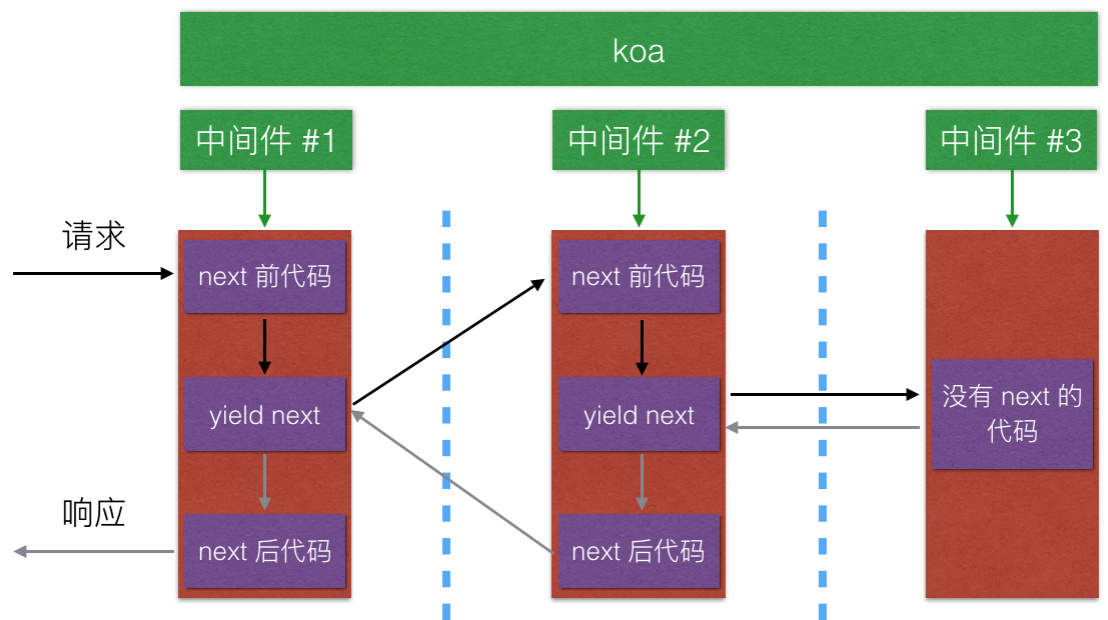
const Koa = require('koa');
const app = new Koa();

// x-response-time

app.use(async (ctx, next) => {
  const start = Date.now();
  await next();
  const ms = Date.now() - start;
  ctx.set('X-Response-Time', `${ms}ms`);
});

// logger

app.use(async (ctx, next) => {
  const start = Date.now();
  await next();
  const ms = Date.now() - start;
  console.log(`${ctx.method} ${ctx.url} - ${ms}`);
});

// response

app.use(async ctx => {
  ctx.body = 'Hello World';
});

app.listen(3000);
4. 上下文(Context) #
Koa Context 将 node 的 request 和 response 对象封装到单个对象中,为编写 Web 应用程序和 API 提供了许多有用的方法
- ctx.request; // 这是 koa Request
- ctx.response; // 这是 koa Response
- ctrx.req //原始的http请求对象
- ctx.res //原始的http响应对象
- ctx.app 应用程序实例引用
- ctx.request是Koa2中context经过封装的请求对象
绕过 Koa 的 response 处理是 不被支持的
5.获取请求参数 #
const Koa = require('koa');
const app = new Koa();
app.use(async (ctx) => {
    console.log(ctx.method); //获取请求方法
    console.log(ctx.url);    //获取请求URL
    console.log(ctx.query);  //获取解析的查询字符串对象
    console.log(ctx.querystring); //根据 ? 获取原始查询字符串.
    console.log(ctx.headers);//获取请求头对象
    ctx.body = ctx.url;
});

app.listen(3000, () => {
    console.log('server is starting at port 3000');
});
6.获取请求体 #
const Koa = require('koa');
const querystring = require('querystring');
const app = new Koa();
app.use(async (ctx) => {
    if (ctx.method == 'GET') {
        ctx.set('Content-Type', 'text/html;charset=utf-8');
        ctx.body = (
            `
            <form method="POST">
               <input name="username" >
               <input type="submit">
            </form>
            `
        );
    } else if (ctx.method == 'POST') {
        ctx.set('Content-Type', 'application/json');
        ctx.body = await parseBody(ctx);
    } else {
        ctx.body = 'Not Allowed';
    }
});
function parseBody(ctx) {
    return new Promise(function (resolve, reject) {
        let buffers = [];
        ctx.req.on('data', function (data) {
            buffers.push(data);
        });
        ctx.req.on('end', function (data) {
            let body = buffers.toString();
            body = querystring.parse(body);
            resolve(body);
        });
        ctx.req.on('error', function (errdata) {
            reject(err);
        });
    });
}

app.listen(3000, () => {
    console.log('server is starting at port 3000');
});
7.使用中间件获取普通请求体 #
npm i koa-bodyparser -Sconst Koa = require('koa');
const querystring = require('querystring');
const bodyParser = require('koa-bodyparser');
const app = new Koa();
app.use(bodyParser());
app.use(async (ctx) => {
if (ctx.method == 'GET') {
ctx.set('Content-Type', 'text/html;charset=utf-8');
ctx.body = (
`
<form method="POST">
<input name="username" >
<input type="submit">
</form>
`
);
} else if (ctx.method == 'POST') {
ctx.set('Content-Type', 'application/json');
ctx.body = ctx.request.body;
} else {
ctx.body = 'Not Allowed';
}
});
app.listen(3000, () => {
console.log('server is starting at port 3000');
});8.使用中间件获取包含文件的请求体 #
npm i koa-better-body -Sconst Koa = require('koa');
const querystring = require('querystring');
const path = require('path');
const convert = require('koa-convert');
const bodyParser = require('koa-better-body');
const app = new Koa();
app.use(convert(bodyParser({
uploadDir: path.join(__dirname, 'uploads'),
keepExtensions: true
})));
app.use(async (ctx) => {
if (ctx.method == 'GET') {
ctx.set('Content-Type', 'text/html;charset=utf-8');
ctx.body = (
`
<form method="POST" enctype="multipart/form-data">
<input name="username" >
<input name="avatar" type="file" >
<input type="submit">
</form>
`
);
} else if (ctx.method == 'POST') {
ctx.set('Content-Type', 'application/json');
console.log(ctx.request.fields);
ctx.body = ctx.request.body;
} else {
ctx.body = 'Not Allowed';
}
});
app.listen(3000, () => {
console.log('server is starting at port 3000');
});{
username: 'zfpx',
avatar: [File {
domain: null,
_events: {},
_eventsCount: 0,
_maxListeners: undefined,
size: 78540,
path: '\%uploads\%upload_b631c6cbae762214afbe18b6e18d9f68.png',
name: 'mm.png',
type: 'image/png',
hash: null,
lastModifiedDate: 2018 - 03 - 09 T09: 12: 20.679 Z,
_writeStream: [WriteStream]
}]
}9. 路由中间件 #
npm install --save koa-router单级路由
const Koa = require('koa');
const Router = require('koa-router');
const app = new Koa();

let user = new Router();
user.get('/user', function (ctx) {
    ctx.body = 'get user ';
}).get('/query/:id', function (ctx) {
    ctx.body = ctx.params;
}).post('/user', function (ctx) {
    ctx.body = 'post user ';
}).get('/home', function (ctx) {
    ctx.body = 'get home ';
});
app.use(user.routes());

app.listen(3000, () => {
    console.log('server is starting at port 3000');
});
多级路由
let user = new Router();
user.get('/add', function (ctx) {
    ctx.body = 'get user add ';
});

let article = new Router();
article.get('/add', function (ctx) {
    ctx.body = 'get article add ';
});

let router = new Router();
router.use('/user', user.routes());
router.use('/article', article.routes());
app.use(router.routes());
10.cookie #
- ctx.cookies.get(name,[optins]):读取上下文请求中的cookie。
- ctx.cookies.set(name,value,[options]):在上下文中写入cookie。
- domain:写入cookie所在的域名
- path:写入cookie所在的路径
- maxAge:Cookie最大有效时长
- expires:cookie失效时间
- httpOnly:是否只用http请求中获得
- overwirte:是否允许重写
app.use(async (ctx, next) => {
    console.log(ctx.url);

    if (ctx.url == '/write') {
        ctx.cookies.set('name', 'zfpx');
        ctx.body = 'write';
    } else {
        next();
    }
});
app.use(async (ctx) => {
    if (ctx.url == '/read') {
        ctx.body = ctx.cookies.get('name');
    }
});
11.session #
$ npm install koa-sessionconst Koa = require('koa');
const session = require('koa-session');
const app = new Koa();
app.keys = ['zfpx'];
app.use(session({}, app));
app.use(async (ctx) => {
let visit = ctx.session.visit;
if (visit) {
visit = visit + 1;
} else {
visit = 1;
}
ctx.session.visit = visit;
ctx.body = `这是你的第${visit}次访问`;
});
app.listen(3000);12. 模板引擎 #
npm i koa-views ejs -Sconst Koa = require('koa');
const views = require('koa-views');
const path = require('path');
const app = new Koa();
app.use(views(path.join(__dirname, './views'), {
extension: 'ejs'
}));
app.use(async ctx => {
await ctx.render('index', { name: '前端培训' });
});
app.listen(3000, () => {
console.log('server is starting at port 3000');
});13. 静态资源中间件 #
npm install --save koa-staticconst static = require('koa-static')
const app = new Koa()
app.use(static(path.join( __dirname, 'public')))
app.use( async ( ctx ) => {
ctx.body = 'Not Found'
})14. koa实现 #
const Koa = require('./koa');
const app = new Koa();
app.use(async (async, next) => {
    console.log(1);
    await next();
    console.log(2);
});
app.use(async (ctx, next) => {
    console.log(3);
    await next();
    console.log(4);
});
app.use(async (ctx, next) => {
    console.log(5);
});
app.listen(3000);
let http = require('http');
class Koa {
constructor() {
this.middleware = [];
}
use(fn) {
this.middleware.push(fn);
}
listen(port) {
let middleware = this.middleware;
let server = http.createServer((req, res) => {
let ctx = { req, res }
function dispatch(idx) {
middleware[idx](ctx, () => dispatch(idx + 1));
}
dispatch(0);
});
server.listen(port);
}
}
module.exports = Koa;15. generator #
$ npm install -g koa-generator$ koa /tmp/foo && cd /tmp/foo
$ npm install
$ npm start16. form-data #
const Koa = require('koa');
const views = require('koa-views');
const fs = require('fs');
let querystring = require('querystring');
let path = require('path');
let uuid = require('uuid');
const app = new Koa();
app.use(async (ctx, next) => {
    if (ctx.method == 'GET') {
        ctx.set('Content-Type', 'text/html;charset=utf8');
        ctx.body = (
            `
                <form id="userform" method="POST" enctype="multipart/form-data">
                  用户名:<input type="text"  name="username">
                  密码<input type="text" name="password">
                  头像<input type="file" name="avatar">
                  <input type="submit">
                 </form>
                `
        );
    } else if (ctx.method == 'POST') {
        let buffers = [];
        ctx.req.on('data', function (data) {
            buffers.push(data);
        });
        ctx.req.on('end', function () {
            let result = Buffer.concat(buffers);
            let type = ctx.headers['content-type'];
            let matched = type.match(/\bboundary=(.+)\b/);
            if (matched) {
                let seperator = '--' + matched[1];
                let body = process(seperator, result);
                ctx.body = body;
            } else {
                next();
            }
        });
        ctx.body = 'hello';
    } else {
        next();
    }

});
app.listen(3000);
Buffer.prototype.split = Buffer.prototype.split || function (sep) {
    let len = Buffer.byteLength(sep);
    let parts = [];
    let offset = 0;
    let pos = -1;
    while (-1 != (pos = this.indexOf(sep, offset))) {
        parts.push(this.slice(offset, pos));
        offset = pos + len;
    }
    parts.push(this.slice(offset));
    return parts;
}
function process(seperator, result) {
    let lines = result.split(seperator);
    lines = lines.slice(1, -1);
    let body = {};
    let files = [];
    lines.forEach(function (line) {
        let [desc, val] = line.split('\r\n\r\n');
        desc = desc.toString();
        val = val.slice(0, -2);
        if (desc.includes('filename')) {//如果是文件的话
            let [, line1, line2] = desc.split('\r\n');
            let obj1 = querystring.parse(line1, '; ');
            let obj2 = querystring.parse(line2, '; ');
            let filepath = path.join(__dirname, 'uploads', uuid.v4());
            fs.writeFileSync(filepath, val);
            files.push({
                ...obj1, filepath
            });
        } else {
            let matched = desc.match(/\bname=(.+)\b/);
            if (matched)
                body[matched[1]] = val.toString();
        }
    });
    return { body, files };
}