1. CSS模块化方案 #
1.1 CSS 命名方法 #
- 通过人工的方式来约定命名规则
- BEM是一种典型的 CSS 命名方法论,BEM的命名规矩就是
block-name__element-name--modifier-name,也就是模块名 + 元素名 + 修饰器名 - OOCSS(Object-Oriented CSS)即面向对象的 CSS,它借鉴了 OOP(面向对象编程)的抽象思维,主张将元素的样式抽象成多个独立的小型样式类,来提高样式的灵活性和可重用性。
- ITCSS(Inverted Triangle CSS,倒三角 CSS)是一套方便扩展和管理的 CSS 体系架构,它兼容 BEM、OOCSS、SMACSS 等 CSS 命名方法论
- SMACSS即可伸缩及模块化的 CSS 结构
1.2 CSS Modules #
- CSS Modules:一个 CSS 文件就是一个独立的模块,核心思想是 通过组件名的唯一性来保证选择器的唯一性,从而保证样式不会污染到组件外
- CSS Modules允许我们像 import 一个 JS Module 一样去 import 一个 CSS Module.每一个 CSS 文件都是一个独立的模块,每一个类名都是该模块所导出对象的一个属性。通过这种方式,便可在使用时明确指定所引用的 CSS 样式。并且,CSS Modules 在打包时会自动将 id 和 class 混淆成全局唯一的 hash 值,从而避免发生命名冲突问题。
- 使用 CSS Modules 时,推荐配合 CSS 预处理器(Sass/Less/Stylus)一起使用
- CSS 预处理器提供了许多有用的功能,如嵌套、变量、mixins、functions 等,同时也让定义本地名称或全局名称变得容易
1.3 CSS-in-JS #
- React 的出现,打破了以前
关注点分离的网页开发原则,因其采用组件结构,而组件又强制要求将 HTML、CSS 和 JS 代码写在一起。表面上看是技术的倒退,实际上并不是 - React 是在 JS 中实现了对 HTML 和 CSS 的封装,赋予了 HTML 和 CSS 全新的
编程能力。对于 HTML,衍生了 JSX 这种 JS 的语法扩展,你可以将其理解为HTML-in-JS;对于 CSS,衍生出一系列的第三方库,用来加强在 JS 中操作 CSS 的能力,它们被称为CSS-in-JS - 随着 React 的流行以及组件化开发模式的深入人心,这种
关注点混合的新写法逐渐成为主流 - 实现
- styled-components 36.7K
- emotion 15K
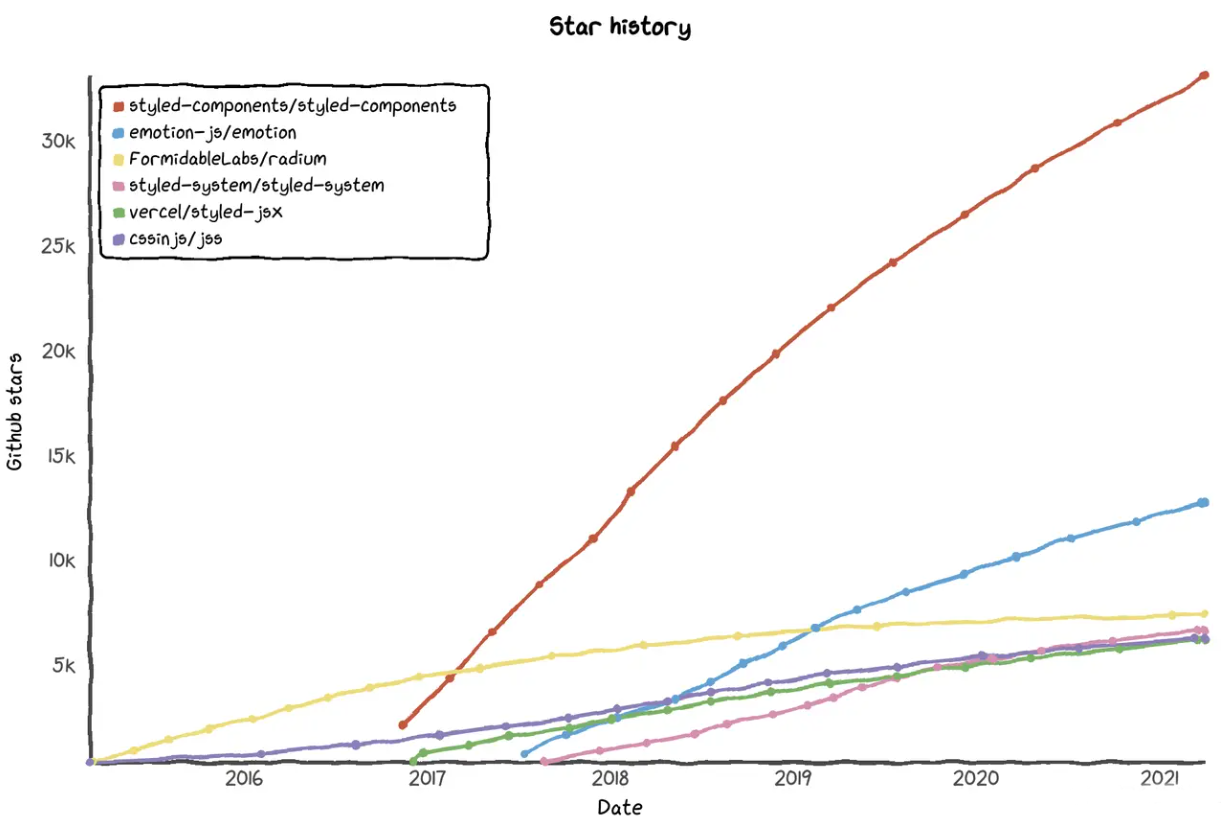
1.3.1 案例 #
- material-ui世界上最受欢迎的 React UI 框架
1.3.2 CSS-IN-JS优缺点 #
- 优点
Scoping Styles可以让CSS拥有独立的作用域,实现局部样式,防止样式冲突和影响组件外的内容Dead Code Elimination避免无用的CSS样式堆积Critical CSS重要的CSS放在头部的style标签内,其它的CSS异步加载可以减少渲染阻塞State-based styling根据组件的状态动态地生成样式更彻底的封装让组件拥有更好的移植性和重用性- 缺点
Steep learning curve陡峭的学习曲线Runtime cost运行时消耗Unreadable class names代码可读性差No interoperability没有统一的 业界标准
1.3.3 选型 #
- 我们一定要根据自己的实际情况进行衡量和取舍来确定是不是要在自己的项目中使用它
- 前端初学者、页面功能简单、重视代码可读性和可维护性不要选择
- 如果经验丰富、应用交互逻辑复杂、重视封装性和可移植性可以尝试
2. emotion #
- emotion是一个用JS编写CSS样式的库
emotion是新一代的CSS-IN-JS解决方案CSS-in-JS实现是通过生成唯一的CSS选择器来达到CSS局部作用域的效果
3.@emotion/css #
- @emotion/css与框架无关,是使用 Emotion 的最简单方法
- 不需要额外的设置、babel插件或其他配置更改
- 支持自动供应商前缀、嵌套选择器和媒体查询
3.1 模板字符串 #
3.1.1 src\main.jsx #
src\main.jsx
import React from 'react'
import ReactDOM from 'react-dom'
import App from './App'
ReactDOM.render(
  <App />,
  document.getElementById('root')
)
3.1.2 src\App.jsx #
src\App.jsx
import { css } from './@emotion/css'
const className = css`
 color: red;
`;
function App() {
  return (
    <div className={className}>
      App
    </div>
  )
}
export default App
3.1.3 css\index.js #
src\@emotion\css\index.js
export { default as css } from './css';3.1.4 css.js #
src\@emotion\css\css.js
import { serializeStyles } from '../serialize';
import { insertStyles } from '../utils';
function css(...args) {
  const serialized = serializeStyles(args);
  insertStyles(serialized);
  return 'css' + "-" + serialized.name;
}
export default css;
3.1.5 serialize\index.jsx #
src\@emotion\serialize\index.jsx
export { default as serializeStyles } from './serializeStyles';3.1.6 serializeStyles.jsx #
src\@emotion\serialize\serializeStyles.jsx
import { hashString } from '../utils';
function serializeStyles(args) {
  let styles = '';
  const strings = args[0];
  styles += strings[0];
  const name = hashString(styles);
  return { name, styles }
}
export default serializeStyles;
3.1.7 utils\index.jsx #
src\@emotion\utils\index.jsx
export { default as insertStyles } from './insertStyles'
export { default as hashString } from './hashString';
3.1.8 hashString.jsx #
src\@emotion\utils\hashString.jsx
function hashString(keys) {
  let val = 10000000;
  for (let i = 0; i < keys.length; i++) {
    val += keys.charCodeAt(i);
  }
  return val.toString(16).slice(0, 6);
}
export default hashString;
3.1.9 insertStyles.jsx #
src\@emotion\utils\insertStyles.jsx
function insertStyles(serialized) {
  const className = 'css' + "-" + serialized.name;
  const rule = "." + className + "{" + serialized.styles + "}";
  const tag = document.createElement('style');
  tag.setAttribute('data-emotion', 'css');
  tag.appendChild(document.createTextNode(rule));
  document.head.appendChild(tag);
}
export default insertStyles;
3.2 对象 #
3.2.1 src\App.jsx #
src\App.jsx
import { css } from './@emotion/css'
+const className = css(
+  {
+    color: 'red'
+  }
+);
function App() {
  return (
    <div className={className}>
      App
    </div>
  )
}
export default App
3.2.2 serializeStyles.jsx #
src\@emotion\serialize\serializeStyles.jsx
import { hashString } from '../utils';
function serializeStyles(args) {
  var styles = '';
  var strings = args[0];
+ if (strings.raw === undefined) {
+   styles += handleInterpolation(strings);
+ } else {
+   styles += strings[0];
+ }
  var name = hashString(styles);
  return { name, styles }
}

+function handleInterpolation(interpolation) {
+  switch (typeof interpolation) {
+    case 'object': {
+      return createStringFromObject(interpolation);
+    }
+  }
+}
+function createStringFromObject(obj) {
+  var string = '';
+  for (var key in obj) {
+    var value = obj[key];
+    string += key + ":" + value + ";";
+  }
+  return string;
+}
export default serializeStyles;
4.@emotion/react #
- @emotion/react包需要React
- 最好将React与可配置的构建环境一起使用
- css属性支持
- 类似于
style prop,但也支持自动供应商前缀、嵌套选择器和媒体查询
- 类似于
npm install @emotion/react --save- pragma(注解) and pragmaFrag cannot be set when runtime is automatic.
4.1 vite.config.js #
vite.config.js
import { defineConfig } from 'vite'
import react from '@vitejs/plugin-react'
export default defineConfig({
  plugins: [react(
    {
+     jsxRuntime: 'classic'
    }
  )]
})
4.2 src\App.jsx #
src\App.jsx
+/** @jsx jsx */
+import { css, jsx } from './@emotion/react'
+const styles = css(
+  {
+    color: 'red'
+  }
+);
function App() {
  return (
+   <div css={styles}>
      App
    </div>
  )
}
export default App
4.3 react\index.jsx #
src\@emotion\react\index.jsx
export { default as css } from './css';
export { default as jsx } from './jsx';
4.4 css.jsx #
src\@emotion\react\css.jsx
import { serializeStyles } from '../serialize';
function css(...args) {
  return serializeStyles(args);
}
export default css;
4.5 jsx.jsx #
src\@emotion\react\jsx.jsx
import { serializeStyles } from '../serialize';
import { Insertion } from '../utils';
function Emotion(props) {
  const serialized = serializeStyles(props.css);
  const { css, ...newProps } = props
  newProps.className = 'css' + "-" + serialized.name;
  const WrappedComponent = props.type;
  return (
    <>
      <Insertion serialized={serialized} />
      <WrappedComponent {...newProps} />
    </>
  )
}

function jsx(type, props, ...children) {
  return (
    <Emotion {...props} type={type}>
      {children}
    </Emotion >
  )
}
export default jsx;
4.6 serializeStyles.jsx #
src\@emotion\serialize\serializeStyles.jsx
import { hashString } from '../utils';
function serializeStyles(args) {
+  if (typeof args === 'object' && args.styles !== undefined) {
+    return args;
+  }
  var styles = '';
  var strings = args[0];
  if (strings == null || strings.raw === undefined) {
    styles += handleInterpolation(strings);
  } else {
    styles += strings[0];
  }
  var name = hashString(styles);
  return { name, styles }
}

function handleInterpolation(interpolation) {
  switch (typeof interpolation) {
    case 'object': {
      return createStringFromObject(interpolation);
    }
  }
}
function createStringFromObject(obj) {
  var string = '';
  for (var key in obj) {
    var value = obj[key];
    string += key + ":" + value + ";";
  }
  return string;
}
export default serializeStyles;
4.7 Insertion.jsx #
src\@emotion\utils\Insertion.jsx
import { useLayoutEffect } from 'react';
import insertStyles from './insertStyles';
function Insertion({ serialized }) {
  useLayoutEffect(() => {
    insertStyles(serialized);
  });
  return null;
};
export default Insertion;
4.8 utils\index.jsx #
src\@emotion\utils\index.jsx
export { default as insertStyles } from './insertStyles';
export { default as hashString } from './hashString';
+export { default as Insertion } from './Insertion';
5. @emotion/styled #
- styled是一种创建附加样式的React组件的方法
npm install @emotion/styled --save5.1 src\App.jsx #
src\App.jsx
+import styled from './@emotion/styled'
+const Button = styled.button(
  {
    color: 'red'
  }
+);
function App() {
  return (
+   <Button>Button</Button>
  )
}
export default App
5.2 styled\index.jsx #
src\@emotion\styled\index.jsx
import { serializeStyles } from '../serialize';
import { Insertion } from '../utils';
function createStyled(tag) {
  return function (...args) {
    function Styled(props) {
      const serialized = serializeStyles(args);
      const className = 'css' + "-" + serialized.name;
      const newProps = { ...props };
      newProps.className = className;
      const FinalTag = tag;
      return (
        <>
          <Insertion serialized={serialized} />
          <FinalTag {...newProps} />
        </>
      )
    }
    return Styled;
  }
}
const newStyled = createStyled.bind();
const tags = ['button', 'div'];
tags.forEach(function (tagName) {
  newStyled[tagName] = newStyled(tagName);
});
export default newStyled;
6. 根据props属性覆盖样式 #
6.1 src\App.jsx #
src\App.jsx
import styled from './@emotion/styled'
const Button = styled.button(
  {
    background: 'green',
    color: 'red'
+ }, props => ({
+   color: props.color
+ })
);
function App() {
  return (
+   <Button color="white">Button</Button>
  )
}
export default App
6.2 styled\index.jsx #
src\@emotion\styled\index.jsx
import { serializeStyles } from '../serialize';
import { Insertion } from '../utils';
function createStyled(tag) {
  return function (...args) {
    function Styled(props) {
+     const serialized = serializeStyles(args, props);
      const className = 'css' + "-" + serialized.name;
      const newProps = { ...props };
      newProps.className = className;
      const FinalTag = tag;
      return (
        <>
          <Insertion serialized={serialized} />
          <FinalTag {...newProps} />
        </>
      )
    }
    return Styled;
  }
}
const newStyled = createStyled.bind();
const tags = ['button', 'div'];
tags.forEach(function (tagName) {
  newStyled[tagName] = newStyled(tagName);
});
export default newStyled;
6.3 serializeStyles.jsx #
src\@emotion\serialize\serializeStyles.jsx
import { hashString } from '../utils';
+function serializeStyles(args, props) {
  if (typeof args === 'object' && args.styles !== undefined) {
    return args;
  }
  var styles = '';
  var strings = args[0];
  if (strings.raw === undefined) {
+   styles += handleInterpolation(props, strings);
  } else {
    styles += strings[0];
  }
  for (var i = 1; i < args.length; i++) {
    styles += handleInterpolation(props, args[i]);
  }
  var name = hashString(styles);
  return { name, styles }
}

+function handleInterpolation(props, interpolation) {
  switch (typeof interpolation) {
    case 'object': {
+     return createStringFromObject(props, interpolation);
    }
+   case 'function': {
+     if (props !== undefined) {
+       var result = interpolation(props);
+       return handleInterpolation(props, result);
+     }
+   }
  }
}
function createStringFromObject(obj) {
  var string = '';
  for (var key in obj) {
    var value = obj[key];
    string += key + ":" + value + ";";
  }
  return string;
}
export default serializeStyles;
7. 为组件添加样式 #
7.1 src\App.jsx #
src\App.jsx
import styled from './@emotion/styled'
+function Hello({ className }) {
+  return <button className={className}>Hello</button>
+}
+const RedHello = styled(Hello)`
+  color:red;
+`
function App() {
  return (
+   <RedHello>Button</RedHello>
  )
}
export default App;
8. 父组件设置子组件 #
.css-1wvgi8y-Parent{background:green;}
.css-10c6c3i-Child{color:red;}
.css-1wvgi8y-Parent .eesff8e1{color:blue;}<div class="css-1wvgi8y-Parent eesff8e0">
<div class="css-10c6c3i-Child eesff8e1">App</div>
</div>8.1 vite.config.js #
npm install @emotion/babel-plugin --savevite.config.js
import { defineConfig } from 'vite'
import react from '@vitejs/plugin-react'
export default defineConfig({
  plugins: [react(
    {
      jsxRuntime: 'classic',
      babel: {
+       plugins: ['@emotion/babel-plugin']
      }
    }
  )]
})
8.2 src\App.jsx #
src\App.jsx
import styled from '@emotion/styled'
const Child = styled.div({
  color: 'red'
})
const Parent = styled.div({
  background: 'green',
  [Child]: {
    color: 'blue'
  }
})
function App() {
  return (
    <>
      <Parent>
        <Child>Child</Child>
      </Parent>
      <Child>Child</Child>
    </>
  )
}
export default App
9. 嵌套选择器 #
9.1 src\App.jsx #
src\App.jsx
import styled from '@emotion/styled'
const Container = styled.div`
  width:200px;
  height:200px;
  background:lightgray;
  &:hover{
    background:pink;
  }
  & > p {
    color:green;
  }
`
function App() {
  return (
    <Container>
      Container
      <p>span</p>
    </Container>
  )
}
export default App
10. as属性 #
- 要使用组件内的样式,但要更改呈现的元素,可以使用as属性
10.1 src\App.jsx #
src\App.jsx
import styled from '@emotion/styled'
const Button = styled.button`
 color:red
`

function App() {
  return (
    <Button as="a">
      Button
    </Button>
  )
}
export default App
11.组合样式 #
- 要使用组件内的样式,但要更改呈现的元素,可以使用as属性
11.1 src\App.jsx #
src\App.jsx
/** @jsx jsx */
import { jsx, css } from '@emotion/react'
const base = css`
  color:white;
`
const warning = css`
  background:orange;
`
function App() {
  return (
    <button css={[base, warning]}>Button</button>
  )
}
export default App
12.全局样式 #
12.1 src\App.jsx #
src\App.jsx
/** @jsx jsx */
import { jsx, css, Global } from '@emotion/react'
const reset = css`
  body{
    margin:0;
  }
  a{
    color:red;
  }
`
function App() {
  return (
    <>
      <Global styles={reset} />
      <a>我是a标记</a>
    </>
  )
}
export default App
13.关键帧动画 #
13.1 src\App.jsx #
src\App.jsx
/** @jsx jsx */
import { jsx, css, keyframes } from '@emotion/react'

const bounce = keyframes`
  from {
    transform: translateX(0);
  }
  to {
    transform: translateX(100px);
  }
`
const base = css`
  width:100px;
  height:100px;
  background: green;
  position: absolute;
  animation: ${bounce} 1s ease infinite alternate;
`;
function App() {
  return (
    <div css={[base]}>
      文本
    </div>
  )
}
export default App
14.模板字符串 #
- 模板字符串可以紧跟在一个函数名后面,该函数将被调用来处理这个模板字符串。这被称为
标签模板功能 - 标签模板其实不是模板,而是函数调用的一种特殊形式
- 标签指的就是函数,紧跟在后面的模板字符串就是它的参数
- 如果模板字符里面有变量,就不是简单的调用了,而是会将模板字符串先处理成多个参数,再调用函数
- 模板处理函数的第一个参数(模板字符串数组),还有一个
raw属性,保存的是转义后的原字符串
function tag(stringArr, ...values) {
  console.log(stringArr.raw);
  let output = "";
  let index;
  for (index = 0; index < values.length; index++) {
    output += stringArr[index] + values[index];
  }
  output += stringArr[index]
  return output;
}
let v1 = 1;
let v2 = 2;

let result = tag`a${v1}b${v2}c`;
console.log(result);