1. 进程架构 #
1.1 进程和线程 #
- 当启动一个程序时,操作系统会为该程序分配内存,用来存放代码、运行过程中的数据,这样的运行环境叫做
进程 - 一个进程可以启动和管理多个线程,线程之间可以共享进行数据,任何一个线程出错都可能会导致进程崩溃
1.2 Chrome的进程架构 #
- 浏览器主进程 负责界面显示、用户交互和子进程管理
- 渲染进程 排版引擎和V8引擎运行在该进程中,负责把HTML、CSS和JavaScript转变成网页
- 网络进程 用来加载网络资源的
- GPU进程 用来实现CSS3和3D效果
2. 加载HTML #
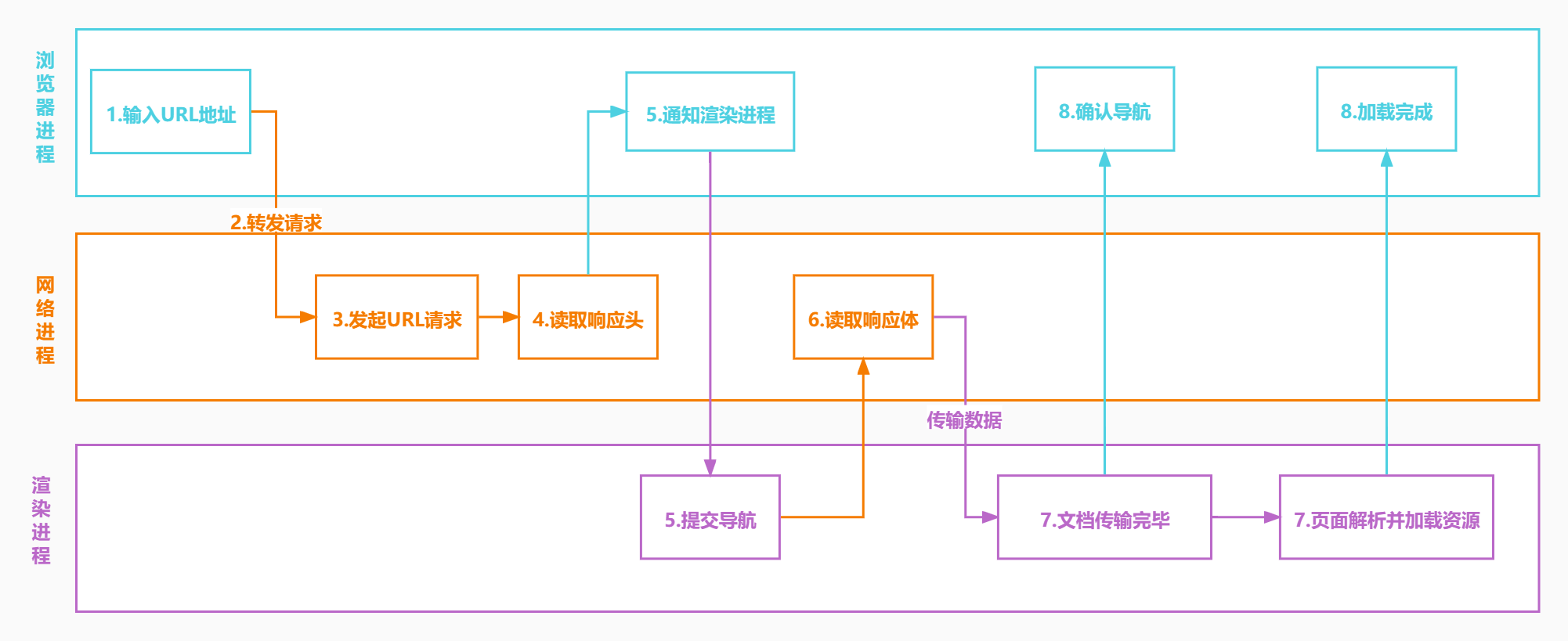
- (1)主进程接收用户输入的URL
- (2)主进程把该URL转发给网络进程
- (3)在网络进程中发起URL请求
- (4)网络进程接收到响应头数据并转发给主进程
- (5)主进程发送提交导航消息到渲染进程
- (6)渲染进程开始从网络进程接收HTML数据
- (7)HTML接收接受完毕后通知主进程确认导航
- (8)渲染进程开始HTML解析和加载子资源
- (9)HTML解析完毕和加载子资源页面加载完成后会通知主进程页面加载完成
2.1 安装npm包 #
cnpm install canvas css express htmlparser2 --save2.2 server\index.js #
server\index.js
const express = require('express');
let app = express();
app.use(express.static('public'));
app.listen(80, () => {
    console.log('server started at 80');
});
2.3 index.html #
server\public\index.html
<html>

<body>
    <div>hello</div>
    <div>world</div>
</body>

</html>
2.4 client\request.js #
client\request.js
const http = require('http');
const main = require('./main.js');
const network = require('./network.js');
const render = require('./render.js');
const host = 'localhost';
const port = 80;

/** 浏览器主进程 **/
main.on('request', function (options) {
    //2.主进程把该URL转发给网络进程
    network.emit('request', options);
})
//开始准备渲染页面
main.on('prepareRender', function (response) {
    //5.主进程发送提交导航消息到渲染进程
    render.emit('commitNavigation', response);
})
main.on('confirmNavigation', function () {
    console.log('confirmNavigation');
})
main.on('DOMContentLoaded', function () {
    console.log('DOMContentLoaded');
})
main.on('Load', function () {
    console.log('Load');
})

/** 网络进程 **/
network.on('request', function (options) {
    //3.在网络进程中发起URL请求
    let request = http.request(options, (response) => {
        //4.网络进程接收到响应头数据并转发给主进程
        main.emit('prepareRender', response);
    });
    //结束请求体
    request.end();
})

/** 渲染进程 **/
//6.渲染进程开始从网络进程接收HTML数据
render.on('commitNavigation', function (response) {
    //开始接收响应体
    const buffers = [];
    response.on('data', (buffer) => {
        //8.渲染进程开始HTML解析和加载子资源
        buffers.push(buffer);
    });
    response.on('end', () => {
        let resultBuffer = Buffer.concat(buffers);
        let html = resultBuffer.toString();
        console.log(html);
        //7.HTML接收接受完毕后通知主进程确认导航
        main.emit('confirmNavigation', html);
        //触发DOMContentLoaded事件
        main.emit('DOMContentLoaded', html);
        //9.HTML解析完毕和加载子资源页面加载完成后会通知主进程页面加载完成
        main.emit('Load');
    });
})

//1.主进程接收用户输入的URL
main.emit('request', { host, port, path: '/index.html' });
2.5 client\render.js #
client\render.js
const EventEmitter = require('events');
class Render extends EventEmitter { }
const render = new Render();
module.exports = render;
2.6 client\network.js #
client\network.js
const EventEmitter = require('events');
class Network extends EventEmitter { }
const network = new Network();
module.exports = network;
2.7 client\render.js #
client\render.js
const EventEmitter = require('events');
class Render extends EventEmitter { }
const render = new Render();
module.exports = render;
2.8 client\gpu.js #
client\gpu.js
const EventEmitter = require('events');
class GPU extends EventEmitter {}
const gpu = new GPU();
module.exports = gpu;
2.9 client\main.js #
client\main.js
const EventEmitter = require('events');
class Main extends EventEmitter { }
const main = new Main();
module.exports = main;
3. 渲染流水线 #
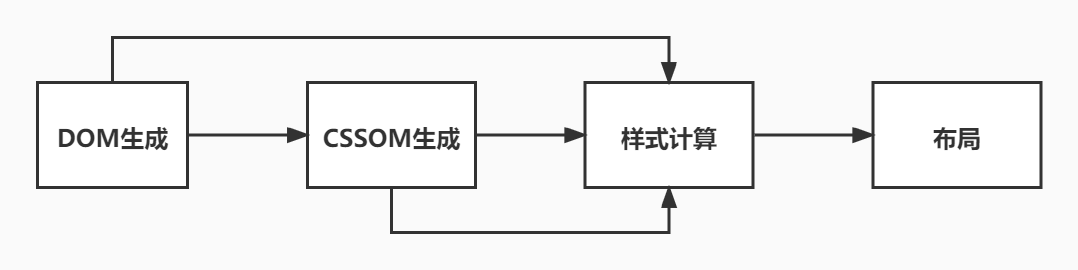
- (1) 渲染进程把HTML转变为DOM树型结构
- (2) 渲染进程把CSS文本转为浏览器中的
stylesheet - (3) 通过stylesheet计算出DOM节点的样式
- (4) 根据DOM树创建布局树
- (5) 并计算各个元素的布局信息
- (6) 根据布局树生成分层树
- (7) 根据分层树进行生成绘制步骤
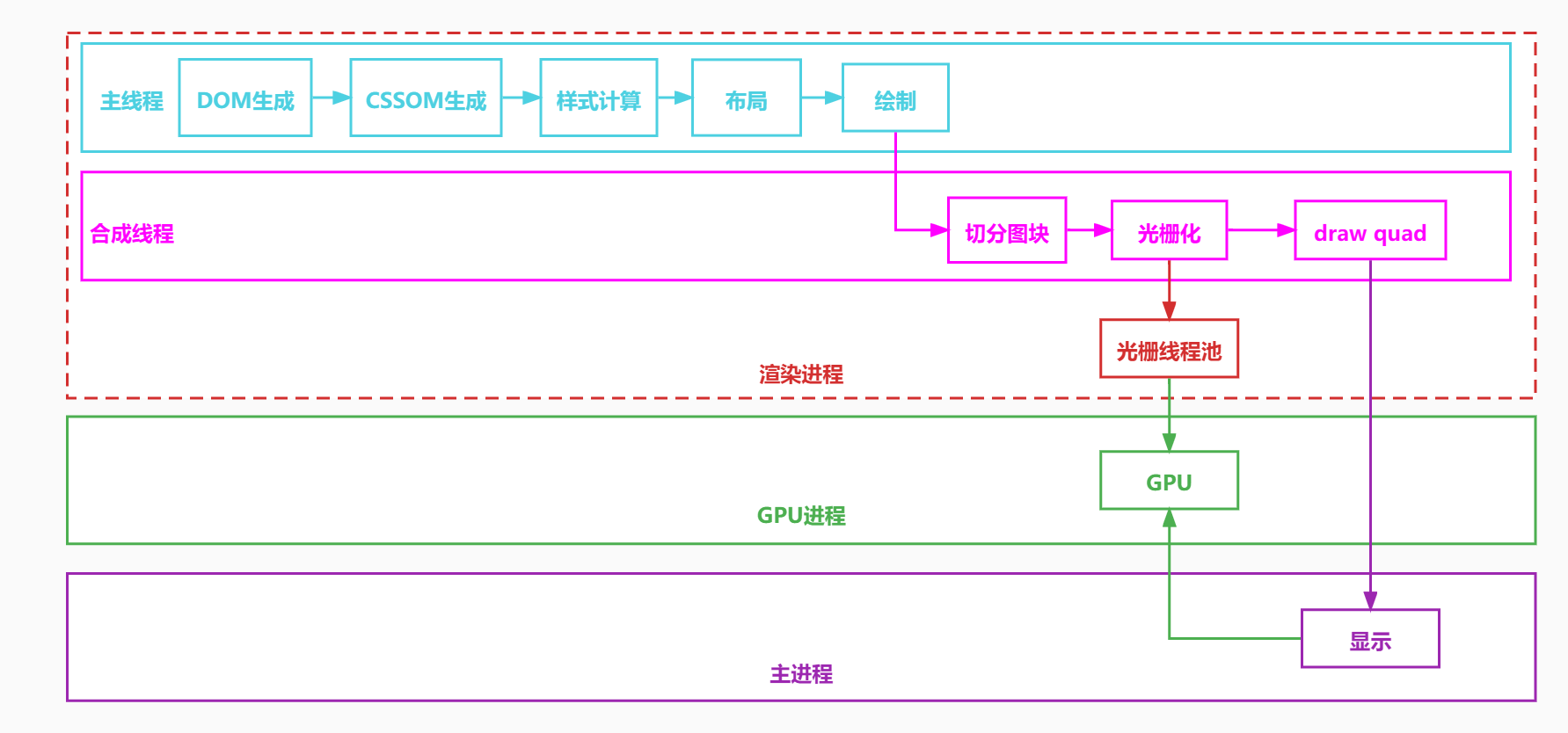
- (8) 把绘制步骤交给渲染进程中的合成线程进行合成
- (9) 合成线程将图层分成图块(tile)
- (10) 合成线程会把分好的图块发给栅格化线程池,栅格化线程会把图片(tile)转化为位图
- (11) 而其实栅格化线程在工作的时候会把栅格化的工作交给GPU进程来完成,最终生成的位图就保存在了
GPU内存中 - (12) 当所有的图块都光栅化之后合成线程会发送绘制图块的命令给浏览器主进程
- (13) 浏览器主进程然后会从GPU内存中取出位图显示到页面上
3.1 HTML转DOM树 #
- 浏览器中的HTML解析器可以把HTML字符串转换成DOM结构
- HTML解析器边接收网络数据边解析HTML
- 解析DOM
- HTML字符串转Token
- Token栈用来维护节点之间的父子关系,Token会依次压入栈中
- 如果是开始标签,把Token压入栈中并且创建新的DOM节点并添加到父节点的children中
- 如果是文本Token,则把文本节点添加到栈顶元素的children中,文本Token不需要入栈
- 如果是结束标签,此开始标签出栈
3.1.1 分词 #
3.1.2 request.js #
client\request.js
+const htmlparser2 = require('htmlparser2');
const http = require('http');
const main = require('./main.js');
const network = require('./network.js');
const render = require('./render.js');
const host = 'localhost';
const port = 80;
+Array.prototype.top = function () {
+    return this[this.length - 1];
+}
/** 浏览器主进程 **/
main.on('request', function (options) {
    //2.主进程把该URL转发给网络进程
    network.emit('request', options);
})
//开始准备渲染页面
main.on('prepareRender', function (response) {
    //5.主进程发送提交导航消息到渲染进程
    render.emit('commitNavigation', response);
})
main.on('confirmNavigation', function () {
    console.log('confirmNavigation');
})
main.on('DOMContentLoaded', function () {
    console.log('DOMContentLoaded');
})
main.on('Load', function () {
    console.log('Load');
})

/** 网络进程 **/
network.on('request', function (options) {
    //3.在网络进程中发起URL请求
    let request = http.request(options, (response) => {
        //4.网络进程接收到响应头数据并转发给主进程
        main.emit('prepareRender', response);
    });
    //结束请求体
    request.end();
})

/** 渲染进程 **/
//6.渲染进程开始从网络进程接收HTML数据
render.on('commitNavigation', function (response) {
+   const headers = response.headers;
+   const contentType = headers['content-type'];
+   if (contentType.indexOf('text/html') !== -1) {
+       //1. 渲染进程把HTML转变为DOM树型结构
+       const document = { type: 'document', attributes: {}, children: [] };
+       const tokenStack = [document];
+       const parser = new htmlparser2.Parser({
+           onopentag(name, attributes = {}) {
+               const parent = tokenStack.top();
+               const element = {
+                   type: 'element',
+                   tagName: name,
+                   children: [],
+                   attributes,
+                   parent
+               }
+               parent.children.push(element);
+               tokenStack.push(element);
+           },
+           ontext(text) {
+               if (!/^[\r\n\s]*$/.test(text)) {
+                   const parent = tokenStack.top();
+                   const textNode = {
+                       type: 'text',
+                       children: [],
+                       attributes: {},
+                       parent,
+                       text
+                   }
+                   parent.children.push(textNode);
+               }
+           },
+           /**
+            * 在预解析阶段,HTML发现CSS和JS文件会并行下载,等全部下载后先把CSS生成CSSOM,然后再执行JS脚本
+            * 然后再构建DOM树,重新计算样式,构建布局树,绘制页面
+            * @param {*} tagname
+            */
+           onclosetag() {
+               tokenStack.pop();
+           },
+       });
+       //开始接收响应体
+       const buffers = [];
+       response.on('data', (buffer) => {
+           //8.渲染进程开始HTML解析和加载子资源
+           //网络进程加载了多少数据,HTML 解析器便解析多少数据。
+           parser.write(buffer.toString());
+       });
+       response.on('end', () => {
-           //let resultBuffer = Buffer.concat(buffers);
-           //let html = resultBuffer.toString();
-           console.dir(document, { depth: null });
+           //7.HTML接收接受完毕后通知主进程确认导航
+           main.emit('confirmNavigation');
+           //触发DOMContentLoaded事件
+           main.emit('DOMContentLoaded');
+           //9.HTML解析完毕和加载子资源页面加载完成后会通知主进程页面加载完成
+           main.emit('Load');
+       });
+  }
})

//1.主进程接收用户输入的URL
+main.emit('request', { host, port, path: '/html.html' });
let document = {
type: 'document',
children: [
{
type: 'element',
tagName: 'html',
children: [
{
type: 'element',
tagName: 'body',
children: [
{
type: 'element',
tagName: 'div',
children: [
{
type: 'text',
text: 'hello'
}
]
},
{
type: 'element',
tagName: 'div',
children: [
{
type: 'text',
text: 'world'
}
]
}
]
}
]
}
]
}3.2 CSS转stylesheet #
- 渲染进程把CSS文本转为浏览器中的
stylesheet - CSS来源可能有link标签、style标签和style行内样式
- 渲染引擎会把CSS转换为
document.styleSheets
3.2.1 index.html #
<html>
+<head>
+    <style>
+        div {
+            color: red;
+        }
+    </style>
+</head>
<body>
    <div>hello</div>
    <div>world</div>
</body>
</html>
3.2.2 request.js #
client\request.js
const htmlparser2 = require('htmlparser2');
const http = require('http');
+const css = require("css");
const main = require('./main.js');
const network = require('./network.js');
const render = require('./render.js');
const host = 'localhost';
const port = 80;
Array.prototype.top = function () {
    return this[this.length - 1];
}
/** 浏览器主进程 **/
main.on('request', function (options) {
    //2.主进程把该URL转发给网络进程
    network.emit('request', options);
})
//开始准备渲染页面
main.on('prepareRender', function (response) {
    //5.主进程发送提交导航消息到渲染进程
    render.emit('commitNavigation', response);
})
main.on('confirmNavigation', function () {
    console.log('confirmNavigation');
})
main.on('DOMContentLoaded', function () {
    console.log('DOMContentLoaded');
})
main.on('Load', function () {
    console.log('Load');
})

/** 网络进程 **/
network.on('request', function (options) {
    //3.在网络进程中发起URL请求
    let request = http.request(options, (response) => {
        //4.网络进程接收到响应头数据并转发给主进程
        main.emit('prepareRender', response);
    });
    //结束请求体
    request.end();
})

/** 渲染进程 **/
//6.渲染进程开始从网络进程接收HTML数据
render.on('commitNavigation', function (response) {
    const headers = response.headers;
    const contentType = headers['content-type'];
    if (contentType.indexOf('text/html') !== -1) {
        //1. 渲染进程把HTML转变为DOM树型结构
        const document = { type: 'document', attributes: {}, children: [] };
+       const cssRules = [];
        const tokenStack = [document];
        const parser = new htmlparser2.Parser({
            onopentag(name, attributes = {}) {
                const parent = tokenStack.top();
                const element = {
                    type: 'element',
                    tagName: name,
                    children: [],
                    attributes,
                    parent
                }
                parent.children.push(element);
                tokenStack.push(element);
            },
            ontext(text) {
                if (!/^[\r\n\s]*$/.test(text)) {
                    const parent = tokenStack.top();
                    const textNode = {
                        type: 'text',
                        children: [],
                        attributes: {},
                        parent,
                        text
                    }
                    parent.children.push(textNode);
                }
            },
            /**
             * 在预解析阶段,HTML发现CSS和JS文件会并行下载,等全部下载后先把CSS生成CSSOM,然后再执行JS脚本
             * 然后再构建DOM树,重新计算样式,构建布局树,绘制页面
             * @param {*} tagname
             */
+           onclosetag(tagname) {
+               switch (tagname) {
+                   case 'style':
+                       const styleToken = tokenStack.top();
+                       const cssAST = css.parse(styleToken.children[0].text);
+                       cssRules.push(...cssAST.stylesheet.rules);
+                       break;
+                   default:
+                       break;
+               }
                tokenStack.pop();
            },
        });
        //开始接收响应体
        response.on('data', (buffer) => {
            //8.渲染进程开始HTML解析和加载子资源
            //网络进程加载了多少数据,HTML 解析器便解析多少数据。
            parser.write(buffer.toString());
        });
        response.on('end', () => {
+           console.log(cssRules);
            //7.HTML接收接受完毕后通知主进程确认导航
            main.emit('confirmNavigation');
            //触发DOMContentLoaded事件
            main.emit('DOMContentLoaded');
            //9.HTML解析完毕和加载子资源页面加载完成后会通知主进程页面加载完成
            main.emit('Load');
        });
    }

})

//1.主进程接收用户输入的URL
main.emit('request', { host, port, path: '/index.html' });
3.3 计算出DOM节点的样式 #
- 根据CSS的继承和层叠规则计算DOM节点的样式
- DOM节点的样式保存在了
ComputedStyle中
3.3.1 index.html #
server\public\index.html
<html>
+<head>
+    <style>
+        #hello {
+            color: red;
+        }
+        .world {
+            color: green;
+        }
+    </style>
+</head>
<body>
+   <div id="hello">hello</div>
+   <div class="world">world</div>
</body>
</html>
3.3.2 client\request.js #
client\request.js
const htmlparser2 = require('htmlparser2');
const http = require('http');
const css = require("css");
const main = require('./main.js');
const network = require('./network.js');
const render = require('./render.js');
const host = 'localhost';
const port = 80;
Array.prototype.top = function () {
    return this[this.length - 1];
}
/** 浏览器主进程 **/
main.on('request', function (options) {
    //2.主进程把该URL转发给网络进程
    network.emit('request', options);
})
//开始准备渲染页面
main.on('prepareRender', function (response) {
    //5.主进程发送提交导航消息到渲染进程
    render.emit('commitNavigation', response);
})
main.on('confirmNavigation', function () {
    console.log('confirmNavigation');
})
main.on('DOMContentLoaded', function () {
    console.log('DOMContentLoaded');
})
main.on('Load', function () {
    console.log('Load');
})

/** 网络进程 **/
network.on('request', function (options) {
    //3.在网络进程中发起URL请求
    let request = http.request(options, (response) => {
        //4.网络进程接收到响应头数据并转发给主进程
        main.emit('prepareRender', response);
    });
    //结束请求体
    request.end();
})

/** 渲染进程 **/
//6.渲染进程开始从网络进程接收HTML数据
render.on('commitNavigation', function (response) {
    const headers = response.headers;
    const contentType = headers['content-type'];
    if (contentType.indexOf('text/html') !== -1) {
        //1. 渲染进程把HTML转变为DOM树型结构
        const document = { type: 'document', attributes: {}, children: [] };
        const cssRules = [];
        const tokenStack = [document];
        const parser = new htmlparser2.Parser({
            onopentag(name, attributes = {}) {
                const parent = tokenStack.top();
                const element = {
                    type: 'element',
                    tagName: name,
                    children: [],
                    attributes,
                    parent
                }
                parent.children.push(element);
                tokenStack.push(element);
            },
            ontext(text) {
                if (!/^[\r\n\s]*$/.test(text)) {
                    const parent = tokenStack.top();
                    const textNode = {
                        type: 'text',
                        children: [],
                        attributes: {},
                        parent,
                        text
                    }
                    parent.children.push(textNode);
                }
            },
            /**
             * 在预解析阶段,HTML发现CSS和JS文件会并行下载,等全部下载后先把CSS生成CSSOM,然后再执行JS脚本
             * 然后再构建DOM树,重新计算样式,构建布局树,绘制页面
             * @param {*} tagname
             */
            onclosetag(tagname) {
                switch (tagname) {
                    case 'style':
                        const styleToken = tokenStack.top();
                        const cssAST = css.parse(styleToken.children[0].text);
                        cssRules.push(...cssAST.stylesheet.rules);
                        break;
                    default:
                        break;
                }
                tokenStack.pop();
            },
        });
        //开始接收响应体
        response.on('data', (buffer) => {
            //8.渲染进程开始HTML解析和加载子资源
            //网络进程加载了多少数据,HTML 解析器便解析多少数据。
            parser.write(buffer.toString());
        });
        response.on('end', () => {
            //7.HTML接收接受完毕后通知主进程确认导航
            main.emit('confirmNavigation');
            //3. 通过stylesheet计算出DOM节点的样式
+           recalculateStyle(cssRules, document);
+           console.dir(document, { depth: null });
            //触发DOMContentLoaded事件
            main.emit('DOMContentLoaded');
            //9.HTML解析完毕和加载子资源页面加载完成后会通知主进程页面加载完成
            main.emit('Load');
        });
    }
})

+function recalculateStyle(cssRules, element, parentComputedStyle = {}) {
+    const attributes = element.attributes;
+    element.computedStyle = {color:parentComputedStyle.color}; // 计算样式
+    Object.entries(attributes).forEach(([key, value]) => {
+        //stylesheets
+        cssRules.forEach(rule => {
+            let selector = rule.selectors[0].replace(/\s+/g, '');
+            if ((selector == '#' + value && key == 'id') || (selector == '.' + value && key == 'class')) {
+                rule.declarations.forEach(({ property, value }) => {
+                    element.computedStyle[property] = value;
+                })
+            }
+        })
+        //行内样式
+        if (key === 'style') {
+            const attributes = value.split(';');
+            attributes.forEach((attribute) => {
+                const [property, value] = attribute.split(/:\s*/);
+                element.computedStyle[property] = value;
+            });
+        }
+    });
+    element.children.forEach(child => recalculateStyle(cssRules, child,element.computedStyle));
+}

//1.主进程接收用户输入的URL
main.emit('request', { host, port, path: '/index.html' });
3.4 创建布局树 #
- 创建布局树
- 创建一棵只包含可见元素的布局树
3.4.1 index.html #
server\public\index.html
<html>
<head>
    <style>
        #hello {
            color: red;
        }
        .world {
            color: green;
        }
    </style>
</head>
<body>
    <div id="hello">hello</div>
+   <div class="world" style="display:none">world</div>
</body>
</html>
3.4.2 request.js #
client\request.js
const htmlparser2 = require('htmlparser2');
const http = require('http');
const css = require("css");
const main = require('./main.js');
const network = require('./network.js');
const render = require('./render.js');
const host = 'localhost';
const port = 80;
Array.prototype.top = function () {
    return this[this.length - 1];
}
/** 浏览器主进程 **/
main.on('request', function (options) {
    //2.主进程把该URL转发给网络进程
    network.emit('request', options);
})
//开始准备渲染页面
main.on('prepareRender', function (response) {
    //5.主进程发送提交导航消息到渲染进程
    render.emit('commitNavigation', response);
})
main.on('confirmNavigation', function () {
    console.log('confirmNavigation');
})
main.on('DOMContentLoaded', function () {
    console.log('DOMContentLoaded');
})
main.on('Load', function () {
    console.log('Load');
})

/** 网络进程 **/
network.on('request', function (options) {
    //3.在网络进程中发起URL请求
    let request = http.request(options, (response) => {
        //4.网络进程接收到响应头数据并转发给主进程
        main.emit('prepareRender', response);
    });
    //结束请求体
    request.end();
})

/** 渲染进程 **/
//6.渲染进程开始从网络进程接收HTML数据
render.on('commitNavigation', function (response) {
    const headers = response.headers;
    const contentType = headers['content-type'];
    if (contentType.indexOf('text/html') !== -1) {
        //1. 渲染进程把HTML转变为DOM树型结构
        const document = { type: 'document', attributes: {}, children: [] };
        const cssRules = [];
        const tokenStack = [document];
        const parser = new htmlparser2.Parser({
            onopentag(name, attributes = {}) {
                const parent = tokenStack.top();
                const element = {
                    type: 'element',
                    tagName: name,
                    children: [],
                    attributes,
                    parent
                }
                parent.children.push(element);
                tokenStack.push(element);
            },
            ontext(text) {
                if (!/^[\r\n\s]*$/.test(text)) {
                    const parent = tokenStack.top();
                    const textNode = {
                        type: 'text',
                        children: [],
                        attributes: {},
                        parent,
                        text
                    }
                    parent.children.push(textNode);
                }
            },
            /**
             * 在预解析阶段,HTML发现CSS和JS文件会并行下载,等全部下载后先把CSS生成CSSOM,然后再执行JS脚本
             * 然后再构建DOM树,重新计算样式,构建布局树,绘制页面
             * @param {*} tagname
             */
            onclosetag(tagname) {
                switch (tagname) {
                    case 'style':
                        const styleToken = tokenStack.top();
                        const cssAST = css.parse(styleToken.children[0].text);
                        cssRules.push(...cssAST.stylesheet.rules);
                        break;
                    default:
                        break;
                }
                tokenStack.pop();
            },
        });
        //开始接收响应体
        response.on('data', (buffer) => {
            //8.渲染进程开始HTML解析和加载子资源
            //网络进程加载了多少数据,HTML 解析器便解析多少数据。
            parser.write(buffer.toString());
        });
        response.on('end', () => {
            //7.HTML接收接受完毕后通知主进程确认导航
            main.emit('confirmNavigation');
            //3. 通过stylesheet计算出DOM节点的样式
            recalculateStyle(cssRules, document);
+           //4. 根据DOM树创建布局树,就是复制DOM结构并过滤掉不显示的元素
+           const html = document.children[0];
+           const body = html.children[1];
+           const layoutTree = createLayout(body);
+           console.dir(layoutTree, { depth: null });
            //触发DOMContentLoaded事件
            main.emit('DOMContentLoaded');
            //9.HTML解析完毕和加载子资源页面加载完成后会通知主进程页面加载完成
            main.emit('Load');
        });
    }
})
+function createLayout(element) {
+    element.children = element.children.filter(isShow);
+    element.children.forEach(child => createLayout(child));
+    return element;
+}
+function isShow(element) {
+    let isShow = true;
+   if (element.tagName === 'head' || element.tagName === 'script') {
+        isShow = false;
+    }
+    const attributes = element.attributes;
+    Object.entries(attributes).forEach(([key, value]) => {
+        if (key === 'style') {
+            const attributes = value.split(';');
+            attributes.forEach((attribute) => {
+                const [property, value] = attribute.split(/:\s*/);
+                if (property === 'display' && value === 'none') {
+                    isShow = false;
+                }
+            });
+        }
+    });
+    return isShow;
+}
function recalculateStyle(cssRules, element, parentComputedStyle = {}) {
    const attributes = element.attributes;
    element.computedStyle = {color:parentComputedStyle.color}; // 计算样式
    Object.entries(attributes).forEach(([key, value]) => {
        //stylesheets
        cssRules.forEach(rule => {
            let selector = rule.selectors[0].replace(/\s+/g, '');
            if ((selector == '#' + value && key == 'id') || (selector == '.' + value && key == 'class')) {
                rule.declarations.forEach(({ property, value }) => {
                    element.computedStyle[property] = value;
                })
            }
        })
        //行内样式
        if (key === 'style') {
            const attributes = value.split(';');
            attributes.forEach((attribute) => {
                const [property, value] = attribute.split(/:\s*/);
                element.computedStyle[property] = value;
            });
        }
    });
    element.children.forEach(child => recalculateStyle(cssRules, child,element.computedStyle));
}

//1.主进程接收用户输入的URL
main.emit('request', { host, port, path: '/index.html' });
3.5 计算布局 #
- 计算各个元素的布局
3.5.1 request.js #
client\request.js
const htmlparser2 = require('htmlparser2');
const http = require('http');
const css = require("css");
const main = require('./main.js');
const network = require('./network.js');
const render = require('./render.js');
const host = 'localhost';
const port = 80;
Array.prototype.top = function () {
    return this[this.length - 1];
}
/** 浏览器主进程 **/
main.on('request', function (options) {
    //2.主进程把该URL转发给网络进程
    network.emit('request', options);
})
//开始准备渲染页面
main.on('prepareRender', function (response) {
    //5.主进程发送提交导航消息到渲染进程
    render.emit('commitNavigation', response);
})
main.on('confirmNavigation', function () {
    console.log('confirmNavigation');
})
main.on('DOMContentLoaded', function () {
    console.log('DOMContentLoaded');
})
main.on('Load', function () {
    console.log('Load');
})

/** 网络进程 **/
network.on('request', function (options) {
    //3.在网络进程中发起URL请求
    let request = http.request(options, (response) => {
        //4.网络进程接收到响应头数据并转发给主进程
        main.emit('prepareRender', response);
    });
    //结束请求体
    request.end();
})

/** 渲染进程 **/
//6.渲染进程开始从网络进程接收HTML数据
render.on('commitNavigation', function (response) {
    const headers = response.headers;
    const contentType = headers['content-type'];
    if (contentType.indexOf('text/html') !== -1) {
        //1. 渲染进程把HTML转变为DOM树型结构
        const document = { type: 'document', attributes: {}, children: [] };
        const cssRules = [];
        const tokenStack = [document];
        const parser = new htmlparser2.Parser({
            onopentag(name, attributes = {}) {
                const parent = tokenStack.top();
                const element = {
                    type: 'element',
                    tagName: name,
                    children: [],
                    attributes,
                    parent
                }
                parent.children.push(element);
                tokenStack.push(element);
            },
            ontext(text) {
                if (!/^[\r\n\s]*$/.test(text)) {
                    const parent = tokenStack.top();
                    const textNode = {
                        type: 'text',
                        children: [],
                        attributes: {},
                        parent,
                        text
                    }
                    parent.children.push(textNode);
                }
            },
            /**
             * 在预解析阶段,HTML发现CSS和JS文件会并行下载,等全部下载后先把CSS生成CSSOM,然后再执行JS脚本
             * 然后再构建DOM树,重新计算样式,构建布局树,绘制页面
             * @param {*} tagname
             */
            onclosetag(tagname) {
                switch (tagname) {
                    case 'style':
                        const styleToken = tokenStack.top();
                        const cssAST = css.parse(styleToken.children[0].text);
                        cssRules.push(...cssAST.stylesheet.rules);
                        break;
                    default:
                        break;
                }
                tokenStack.pop();
            },
        });
        //开始接收响应体
        response.on('data', (buffer) => {
            //8.渲染进程开始HTML解析和加载子资源
            //网络进程加载了多少数据,HTML 解析器便解析多少数据。
            parser.write(buffer.toString());
        });
        response.on('end', () => {
            //7.HTML接收接受完毕后通知主进程确认导航
            main.emit('confirmNavigation');
            //3. 通过stylesheet计算出DOM节点的样式
            recalculateStyle(cssRules, document);
           //4. 根据DOM树创建布局树,就是复制DOM结构并过滤掉不显示的元素
           const html = document.children[0];
           const body = html.children[1];
           const layoutTree = createLayout(body);
+          //5.并计算各个元素的布局信息
+          updateLayoutTree(layoutTree);
           //触发DOMContentLoaded事件
           main.emit('DOMContentLoaded');
           //9.HTML解析完毕和加载子资源页面加载完成后会通知主进程页面加载完成
           main.emit('Load');
        });
    }
})
+function updateLayoutTree(element, top = 0, parentTop = 0) {
+    const computedStyle = element.computedStyle;
+    element.layout = {
+        top: top + parentTop,
+        left: 0,
+        width: computedStyle.width,
+        height: computedStyle.height,
+        background: computedStyle.background,
+        color: computedStyle.color
+    }
+    let childTop = 0;
+    element.children.forEach(child => {
+        updateLayoutTree(child, childTop, element.layout.top);
+        childTop += parseInt(child.computedStyle.height || 0);
+    });
+}
function createLayout(element) {
    element.children = element.children.filter(isShow);
    element.children.forEach(child => createLayout(child));
    return element;
}
function isShow(element) {
    let isShow = true;
    if (element.tagName === 'head' || element.tagName === 'script') {
        isShow = false;
    }
    const attributes = element.attributes;
    Object.entries(attributes).forEach(([key, value]) => {
        if (key === 'style') {
            const attributes = value.split(';');
            attributes.forEach((attribute) => {
                const [property, value] = attribute.split(/:\s*/);
                if (property === 'display' && value === 'none') {
                    isShow = false;
                }
            });
        }
    });
    return isShow;
}
function recalculateStyle(cssRules, element, parentComputedStyle = {}) {
    const attributes = element.attributes;
    element.computedStyle = {color:parentComputedStyle.color}; // 计算样式
    Object.entries(attributes).forEach(([key, value]) => {
        //stylesheets
        cssRules.forEach(rule => {
            let selector = rule.selectors[0].replace(/\s+/g, '');
            if ((selector == '#' + value && key == 'id') || (selector == '.' + value && key == 'class')) {
                rule.declarations.forEach(({ property, value }) => {
                    element.computedStyle[property] = value;
                })
            }
        })
        //行内样式
        if (key === 'style') {
            const attributes = value.split(';');
            attributes.forEach((attribute) => {
                const [property, value] = attribute.split(/:\s*/);
                element.computedStyle[property] = value;
            });
        }
    });
    element.children.forEach(child => recalculateStyle(cssRules, child,element.computedStyle));
}

//1.主进程接收用户输入的URL
main.emit('request', { host, port, path: '/index.html' });
3.6 生成分层树 #
- 根据布局树生成分层树
- 渲染引擎需要为某些节点生成单独的图层,并组合成图层树
- z-index
- 绝对定位和固定定位
- 滤镜
- 透明
- 裁剪
- 这些图层合成最终的页面
3.5.1 index.html #
server\public\index.html
<html lang="en">

<head>
    <meta charset="UTF-8">
    <meta http-equiv="X-UA-Compatible" content="IE=edge">
    <meta name="viewport" content="width=device-width, initial-scale=1.0">

    <script type="text/javascript" src="main.js">
    </script>
    <title>chrome</title>
    <style>
        * {
            padding: 0;
            margin: 0;
        }

        #container {
            width: 100px;
            height: 100px;
        }

        .main {
            background: red;
        }

        #hello {
            background: green;
            width: 100px;
            height: 100px;
        }

        #world {
            background: blue;
            width: 100px;
            height: 100px;
        }

        #absolute {
            background: pink;
            width: 50px;
            height: 50px;
            left: 0px;
            top: 0px;
        }
    </style>
</head>

<body>
    <div id="container" class="main"></div>
    <div id="hello" style="color:blue;">hello</div>
    <div id="world" style="display:none">world</div>
    <div id="absolute" style="position:absolute">
        abs
    </div>
</body>

</html>
3.5.2 client\request.js #
client\request.js
const htmlparser2 = require('htmlparser2');
const http = require('http');
const css = require("css");
const main = require('./main.js');
const network = require('./network.js');
const render = require('./render.js');
const host = 'localhost';
const port = 80;
Array.prototype.top = function () {
    return this[this.length - 1];
}
/** 浏览器主进程 **/
main.on('request', function (options) {
    //2.主进程把该URL转发给网络进程
    network.emit('request', options);
})
//开始准备渲染页面
main.on('prepareRender', function (response) {
    //5.主进程发送提交导航消息到渲染进程
    render.emit('commitNavigation', response);
})
main.on('confirmNavigation', function () {
    console.log('confirmNavigation');
})
main.on('DOMContentLoaded', function () {
    console.log('DOMContentLoaded');
})
main.on('Load', function () {
    console.log('Load');
})

/** 网络进程 **/
network.on('request', function (options) {
    //3.在网络进程中发起URL请求
    let request = http.request(options, (response) => {
        //4.网络进程接收到响应头数据并转发给主进程
        main.emit('prepareRender', response);
    });
    //结束请求体
    request.end();
})

/** 渲染进程 **/
//6.渲染进程开始从网络进程接收HTML数据
render.on('commitNavigation', function (response) {
    const headers = response.headers;
    const contentType = headers['content-type'];
    if (contentType.indexOf('text/html') !== -1) {
        //1. 渲染进程把HTML转变为DOM树型结构
        const document = { type: 'document', attributes: {}, children: [] };
        const cssRules = [];
        const tokenStack = [document];
        const parser = new htmlparser2.Parser({
            onopentag(name, attributes = {}) {
                const parent = tokenStack.top();
                const element = {
                    type: 'element',
                    tagName: name,
                    children: [],
                    attributes,
                    parent
                }
                parent.children.push(element);
                tokenStack.push(element);
            },
            ontext(text) {
                if (!/^[\r\n\s]*$/.test(text)) {
                    const parent = tokenStack.top();
                    const textNode = {
                        type: 'text',
                        children: [],
                        attributes: {},
                        parent,
                        text
                    }
                    parent.children.push(textNode);
                }
            },
            /**
             * 在预解析阶段,HTML发现CSS和JS文件会并行下载,等全部下载后先把CSS生成CSSOM,然后再执行JS脚本
             * 然后再构建DOM树,重新计算样式,构建布局树,绘制页面
             * @param {*} tagname
             */
            onclosetag(tagname) {
                switch (tagname) {
                    case 'style':
                        const styleToken = tokenStack.top();
                        const cssAST = css.parse(styleToken.children[0].text);
                        cssRules.push(...cssAST.stylesheet.rules);
                        break;
                    default:
                        break;
                }
                tokenStack.pop();
            },
        });
        //开始接收响应体
        response.on('data', (buffer) => {
            //8.渲染进程开始HTML解析和加载子资源
            //网络进程加载了多少数据,HTML 解析器便解析多少数据。
            parser.write(buffer.toString());
        });
        response.on('end', () => {
            //7.HTML接收接受完毕后通知主进程确认导航
            main.emit('confirmNavigation');
            //3. 通过stylesheet计算出DOM节点的样式
            recalculateStyle(cssRules, document);
            //4. 根据DOM树创建布局树,就是复制DOM结构并过滤掉不显示的元素
            const html = document.children[0];
            const body = html.children[1];
            const layoutTree = createLayout(body);
            //5.并计算各个元素的布局信息
            updateLayoutTree(layoutTree);
+           //6. 根据布局树生成分层树
+           const layers = [layoutTree];
+           createLayerTree(layoutTree, layers);
+           console.log(layers);
            //触发DOMContentLoaded事件
            main.emit('DOMContentLoaded');
            //9.HTML解析完毕和加载子资源页面加载完成后会通知主进程页面加载完成
            main.emit('Load');
        });
    }
})
+function createLayerTree(element, layers) {
+    element.children = element.children.filter((child) => createNewLayer(child, layers));
+    element.children.forEach(child => createLayerTree(child, layers));
+    return layers;
+}
+function createNewLayer(element, layers) {
+    let created = true;
+    const attributes = element.attributes;
+    Object.entries(attributes).forEach(([key, value]) => {
+        if (key === 'style') {
+            const attributes = value.split(';');
+            attributes.forEach((attribute) => {
+                const [property, value] = attribute.split(/:\s*/);
+                if (property === 'position' && value === 'absolute') {
+                    updateLayoutTree(element);//对单独的层重新计算位置
+                    layers.push(element);
+                    created = false;
+                }
+            });
+        }
+    });
+    return created;
+}
function updateLayoutTree(element, top = 0, parentTop = 0) {
    const computedStyle = element.computedStyle;
    element.layout = {
        top: top + parentTop,
        left: 0,
        width: computedStyle.width,
        height: computedStyle.height,
        background: computedStyle.background,
        color: computedStyle.color
    }
    let childTop = 0;
    element.children.forEach(child => {
        updateLayoutTree(child, childTop, element.layout.top);
        childTop += parseInt(child.computedStyle.height || 0);
    });
}
function createLayout(element) {
    element.children = element.children.filter(isShow);
    element.children.forEach(child => createLayout(child));
    return element;
}
function isShow(element) {
    let isShow = true;
    if (element.tagName === 'head' || element.tagName === 'script') {
        isShow = false;
    }
    const attributes = element.attributes;
    Object.entries(attributes).forEach(([key, value]) => {
        if (key === 'style') {
            const attributes = value.split(';');
            attributes.forEach((attribute) => {
                const [property, value] = attribute.split(/:\s*/);
                if (property === 'display' && value === 'none') {
                    isShow = false;
                }
            });
        }
    });
    return isShow;
}
function recalculateStyle(cssRules, element, parentComputedStyle = {}) {
    const attributes = element.attributes;
    element.computedStyle = {color:parentComputedStyle.color}; // 计算样式
    Object.entries(attributes).forEach(([key, value]) => {
        //stylesheets
        cssRules.forEach(rule => {
            let selector = rule.selectors[0].replace(/\s+/g, '');
            if ((selector == '#' + value && key == 'id') || (selector == '.' + value && key == 'class')) {
                rule.declarations.forEach(({ property, value }) => {
                    element.computedStyle[property] = value;
                })
            }
        })
        //行内样式
        if (key === 'style') {
            const attributes = value.split(';');
            attributes.forEach((attribute) => {
                const [property, value] = attribute.split(/:\s*/);
                element.computedStyle[property] = value;
            });
        }
    });
    element.children.forEach(child => recalculateStyle(cssRules, child,element.computedStyle));
}

//1.主进程接收用户输入的URL
main.emit('request', { host, port, path: '/index.html' });
3.6 绘制 #
- 根据分层树进行生成绘制步骤复合图层
- 每个图层会拆分成多个绘制指令,这些指令组合在一起成为绘制列表
3.6.1 client\request.js #
client\request.js
const htmlparser2 = require('htmlparser2');
const http = require('http');
const css = require("css");
const main = require('./main.js');
const network = require('./network.js');
const render = require('./render.js');
const host = 'localhost';
const port = 80;
Array.prototype.top = function () {
    return this[this.length - 1];
}
/** 浏览器主进程 **/
main.on('request', function (options) {
    //2.主进程把该URL转发给网络进程
    network.emit('request', options);
})
//开始准备渲染页面
main.on('prepareRender', function (response) {
    //5.主进程发送提交导航消息到渲染进程
    render.emit('commitNavigation', response);
})
main.on('confirmNavigation', function () {
    console.log('confirmNavigation');
})
main.on('DOMContentLoaded', function () {
    console.log('DOMContentLoaded');
})
main.on('Load', function () {
    console.log('Load');
})

/** 网络进程 **/
network.on('request', function (options) {
    //3.在网络进程中发起URL请求
    let request = http.request(options, (response) => {
        //4.网络进程接收到响应头数据并转发给主进程
        main.emit('prepareRender', response);
    });
    //结束请求体
    request.end();
})

/** 渲染进程 **/
//6.渲染进程开始从网络进程接收HTML数据
render.on('commitNavigation', function (response) {
    const headers = response.headers;
    const contentType = headers['content-type'];
    if (contentType.indexOf('text/html') !== -1) {
        //1. 渲染进程把HTML转变为DOM树型结构
        const document = { type: 'document', attributes: {}, children: [] };
        const cssRules = [];
        const tokenStack = [document];
        const parser = new htmlparser2.Parser({
            onopentag(name, attributes = {}) {
                const parent = tokenStack.top();
                const element = {
                    type: 'element',
                    tagName: name,
                    children: [],
                    attributes,
                    parent
                }
                parent.children.push(element);
                tokenStack.push(element);
            },
            ontext(text) {
                if (!/^[\r\n\s]*$/.test(text)) {
                    const parent = tokenStack.top();
                    const textNode = {
                        type: 'text',
                        children: [],
                        attributes: {},
                        parent,
                        text
                    }
                    parent.children.push(textNode);
                }
            },
            /**
             * 在预解析阶段,HTML发现CSS和JS文件会并行下载,等全部下载后先把CSS生成CSSOM,然后再执行JS脚本
             * 然后再构建DOM树,重新计算样式,构建布局树,绘制页面
             * @param {*} tagname
             */
            onclosetag(tagname) {
                switch (tagname) {
                    case 'style':
                        const styleToken = tokenStack.top();
                        const cssAST = css.parse(styleToken.children[0].text);
                        cssRules.push(...cssAST.stylesheet.rules);
                        break;
                    default:
                        break;
                }
                tokenStack.pop();
            },
        });
        //开始接收响应体
        response.on('data', (buffer) => {
            //8.渲染进程开始HTML解析和加载子资源
            //网络进程加载了多少数据,HTML 解析器便解析多少数据。
            parser.write(buffer.toString());
        });
        response.on('end', () => {
            //7.HTML接收接受完毕后通知主进程确认导航
            main.emit('confirmNavigation');
            //3. 通过stylesheet计算出DOM节点的样式
            recalculateStyle(cssRules, document);
            //4. 根据DOM树创建布局树,就是复制DOM结构并过滤掉不显示的元素
            const html = document.children[0];
            const body = html.children[1];
            const layoutTree = createLayout(body);
            //5.并计算各个元素的布局信息
            updateLayoutTree(layoutTree);
            //6. 根据布局树生成分层树
            const layers = [layoutTree];
            createLayerTree(layoutTree, layers);
+           //7. 根据分层树进行生成绘制步骤并复合图层
+           const paintSteps = compositeLayers(layers);
+           console.log(paintSteps.flat().join('\r\n'));
            //触发DOMContentLoaded事件
            main.emit('DOMContentLoaded');
            //9.HTML解析完毕和加载子资源页面加载完成后会通知主进程页面加载完成
            main.emit('Load');
        });
    }
})
+function compositeLayers(layers) {
+    //10.合成线程会把分好的图块发给栅格化线程池,栅格化线程会把图片(tile)转化为位图
+    return layers.map(layout => paint(layout));
+}
+function paint(element, paintSteps = []) {
+    const { background = 'black', color = 'black', top = 0, left = 0, width = 100, height = 0 } = element.layout;
+    if (element.type === 'text') {
+        paintSteps.push(`ctx.font = '20px Impact;'`);
+        paintSteps.push(`ctx.strokeStyle = '${color}';`);
+        paintSteps.push(`ctx.strokeText("${element.text.replace(/(^\s+|\s+$)/g, '')}", ${left},${top + 20});`);
+    } else {
+        paintSteps.push(`ctx.fillStyle="${background}";`);
+        paintSteps.push(`ctx.fillRect(${left},${top}, ${parseInt(width)}, ${parseInt(height)});`);
+    }
+    element.children.forEach(child => paint(child, paintSteps));
+    return paintSteps;
+}
function createLayerTree(element, layers) {
    element.children = element.children.filter((child) => createNewLayer(child, layers));
    element.children.forEach(child => createLayerTree(child, layers));
    return layers;
}
function createNewLayer(element, layers) {
    let created = true;
    const attributes = element.attributes;
    Object.entries(attributes).forEach(([key, value]) => {
        if (key === 'style') {
            const attributes = value.split(';');
            attributes.forEach((attribute) => {
                const [property, value] = attribute.split(/:\s*/);
                if (property === 'position' && value === 'absolute') {
                    updateLayoutTree(element);//对单独的层重新计算位置
                    layers.push(element);
                    created = false;
                }
            });
        }
    });
    return created;
}
function updateLayoutTree(element, top = 0, parentTop = 0) {
    const computedStyle = element.computedStyle;
    element.layout = {
        top: top + parentTop,
        left: 0,
        width: computedStyle.width,
        height: computedStyle.height,
        background: computedStyle.background,
        color: computedStyle.color
    }
    let childTop = 0;
    element.children.forEach(child => {
        updateLayoutTree(child, childTop, element.layout.top);
        childTop += parseInt(child.computedStyle.height || 0);
    });
}
function createLayout(element) {
    element.children = element.children.filter(isShow);
    element.children.forEach(child => createLayout(child));
    return element;
}
function isShow(element) {
    let isShow = true;
    if (element.tagName === 'head' || element.tagName === 'script') {
        isShow = false;
    }
    const attributes = element.attributes;
    Object.entries(attributes).forEach(([key, value]) => {
        if (key === 'style') {
            const attributes = value.split(';');
            attributes.forEach((attribute) => {
                const [property, value] = attribute.split(/:\s*/);
                if (property === 'display' && value === 'none') {
                    isShow = false;
                }
            });
        }
    });
    return isShow;
}
function recalculateStyle(cssRules, element, parentComputedStyle = {}) {
    const attributes = element.attributes;
    element.computedStyle = {color:parentComputedStyle.color};// 计算样式
    Object.entries(attributes).forEach(([key, value]) => {
        //stylesheets
        cssRules.forEach(rule => {
            let selector = rule.selectors[0].replace(/\s+/g, '');
            if ((selector == '#' + value && key == 'id') || (selector == '.' + value && key == 'class')) {
                rule.declarations.forEach(({ property, value }) => {
                    element.computedStyle[property] = value;
                })
            }
        })
        //行内样式
        if (key === 'style') {
            const attributes = value.split(';');
            attributes.forEach((attribute) => {
                const [property, value] = attribute.split(/:\s*/);
                element.computedStyle[property] = value;
            });
        }
    });
    element.children.forEach(child => recalculateStyle(cssRules, child,element.computedStyle));
}

//1.主进程接收用户输入的URL
main.emit('request', { host, port, path: '/index.html' });
3.7 合成线程 #
- 合成线程将图层分成图块(tile)
- 合成线程会把分好的图块发给栅格化线程池,栅格化线程会把图片(tile)转化为位图
- 而其实栅格化线程在工作的时候会把栅格化的工作交给GPU进程来完成,最终生成的位图就保存在了
GPU内存中 - 当所有的图块都光栅化之后合成线程会发送绘制图块的命令给浏览器主进程
- 浏览器主进程然后会从GPU内存中取出位图显示到页面上
- 合成线程
3.7.1 图块 #
- 图块渲染也称基于瓦片渲染或基于小方块渲染
- 它是一种通过规则的网格细分计算机图形图像并分别渲染图块(tile)各部分的过程

3.7.2 栅格化 #
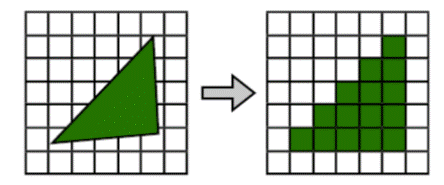
- 栅格化是将矢量图形格式表示的图像转换成位图以用于显示器输出的过程
- 栅格即像素
- 栅格化即将矢量图形转化为位图(栅格图像)
3.7.3 client\gpu.js #
client\gpu.js
const EventEmitter = require('events');
class GPU extends EventEmitter {
    constructor() {
        super();
+       this.bitMaps = [];
    }
}
const gpu = new GPU();
module.exports = gpu;
3.7.4 request.js #
client\request.js
const htmlparser2 = require('htmlparser2');
const http = require('http');
const css = require("css");
+const { createCanvas } = require('canvas')
+const fs = require('fs')
const main = require('./main.js');
const network = require('./network.js');
const render = require('./render.js');
+const gpu = require('./gpu.js');
const host = 'localhost';
const port = 80;
Array.prototype.top = function () {
    return this[this.length - 1];
}
/** 浏览器主进程 **/
main.on('request', function (options) {
    //2.主进程把该URL转发给网络进程
    network.emit('request', options);
})
//开始准备渲染页面
main.on('prepareRender', function (response) {
    //5.主进程发送提交导航消息到渲染进程
    render.emit('commitNavigation', response);
})
main.on('confirmNavigation', function () {
    console.log('confirmNavigation');
})
main.on('DOMContentLoaded', function () {
    console.log('DOMContentLoaded');
})
main.on('Load', function () {
    console.log('Load');
})
+main.on('drawQuad', function () {
+    //14.浏览器主进程然后会从GPU内存中取出位图显示到页面上
+    let drawSteps = gpu.bitMaps.flat();
+    const canvas = createCanvas(150, 250);
+    const ctx = canvas.getContext('2d');
+    eval(drawSteps.join('\r\n'));
+    fs.writeFileSync('result.png', canvas.toBuffer('image/png'));
+})

/** 网络进程 **/
network.on('request', function (options) {
    //3.在网络进程中发起URL请求
    let request = http.request(options, (response) => {
        //4.网络进程接收到响应头数据并转发给主进程
        main.emit('prepareRender', response);
    });
    //结束请求体
    request.end();
})

/** 渲染进程 **/
//6.渲染进程开始从网络进程接收HTML数据
render.on('commitNavigation', function (response) {
    const headers = response.headers;
    const contentType = headers['content-type'];
    if (contentType.indexOf('text/html') !== -1) {
        //1. 渲染进程把HTML转变为DOM树型结构
        const document = { type: 'document', attributes: {}, children: [] };
        const cssRules = [];
        const tokenStack = [document];
        const parser = new htmlparser2.Parser({
            onopentag(name, attributes = {}) {
                const parent = tokenStack.top();
                const element = {
                    type: 'element',
                    tagName: name,
                    children: [],
                    attributes,
                    parent
                }
                parent.children.push(element);
                tokenStack.push(element);
            },
            ontext(text) {
                if (!/^[\r\n\s]*$/.test(text)) {
                    const parent = tokenStack.top();
                    const textNode = {
                        type: 'text',
                        children: [],
                        attributes: {},
                        parent,
                        text
                    }
                    parent.children.push(textNode);
                }
            },
            /**
             * 在预解析阶段,HTML发现CSS和JS文件会并行下载,等全部下载后先把CSS生成CSSOM,然后再执行JS脚本
             * 然后再构建DOM树,重新计算样式,构建布局树,绘制页面
             * @param {*} tagname
             */
            onclosetag(tagname) {
                switch (tagname) {
                    case 'style':
                        const styleToken = tokenStack.top();
                        const cssAST = css.parse(styleToken.children[0].text);
                        cssRules.push(...cssAST.stylesheet.rules);
                        break;
                    default:
                        break;
                }
                tokenStack.pop();
            },
        });
        //开始接收响应体
        response.on('data', (buffer) => {
            //8.渲染进程开始HTML解析和加载子资源
            //网络进程加载了多少数据,HTML 解析器便解析多少数据。
            parser.write(buffer.toString());
        });
        response.on('end', () => {
            //7.HTML接收接受完毕后通知主进程确认导航
            main.emit('confirmNavigation');
            //3. 通过stylesheet计算出DOM节点的样式
            recalculateStyle(cssRules, document);
            //4. 根据DOM树创建布局树,就是复制DOM结构并过滤掉不显示的元素
            const html = document.children[0];
            const body = html.children[1];
            const layoutTree = createLayout(body);
            //5.并计算各个元素的布局信息
            updateLayoutTree(layoutTree);
            //6. 根据布局树生成分层树
            const layers = [layoutTree];
            createLayerTree(layoutTree, layers);
            //7. 根据分层树进行生成绘制步骤并复合图层
            const paintSteps = compositeLayers(layers);
            console.log(paintSteps.flat().join('\r\n'));
+           //8.把绘制步骤交给渲染进程中的合成线程进行合成
+           //9.合成线程会把图层划分为图块(tile)
+           const tiles = splitTiles(paintSteps);
+           //10.合成线程会把分好的图块发给栅格化线程池
+           raster(tiles);
            //触发DOMContentLoaded事件
            main.emit('DOMContentLoaded');
            //9.HTML解析完毕和加载子资源页面加载完成后会通知主进程页面加载完成
            main.emit('Load');
        });
    }
})
+function splitTiles(paintSteps) {
+    return paintSteps;
+}
+function raster(tiles) {
+    //11.栅格化线程会把图片(tile)转化为位图
+    tiles.forEach(tile => rasterThread(tile));
+    //13.当所有的图块都光栅化之后合成线程会发送绘制图块的命令给浏览器主进程
+    main.emit('drawQuad');
+}
+function rasterThread(tile) {
+    //12.而其实栅格化线程在工作的时候会把栅格化的工作交给GPU进程来完成
+    gpu.emit('raster', tile);
+}
function compositeLayers(layers) {
    //10.合成线程会把分好的图块发给栅格化线程池,栅格化线程会把图片(tile)转化为位图
    return layers.map(layout => paint(layout));
}
function paint(element, paintSteps = []) {
    const { background = 'black', color = 'black', top = 0, left = 0, width = 100, height = 0 } = element.layout;
    if (element.type === 'text') {
        paintSteps.push(`ctx.font = '20px Impact;'`);
        paintSteps.push(`ctx.strokeStyle = '${color}';`);
        paintSteps.push(`ctx.strokeText("${element.text.replace(/(^\s+|\s+$)/g, '')}", ${left},${top + 20});`);
    } else {
        paintSteps.push(`ctx.fillStyle="${background}";`);
        paintSteps.push(`ctx.fillRect(${left},${top}, ${parseInt(width)}, ${parseInt(height)});`);
    }
    element.children.forEach(child => paint(child, paintSteps));
    return paintSteps;
}
function createLayerTree(element, layers) {
    element.children = element.children.filter((child) => createNewLayer(child, layers));
    element.children.forEach(child => createLayerTree(child, layers));
    return layers;
}
function createNewLayer(element, layers) {
    let created = true;
    const attributes = element.attributes;
    Object.entries(attributes).forEach(([key, value]) => {
        if (key === 'style') {
            const attributes = value.split(';');
            attributes.forEach((attribute) => {
                const [property, value] = attribute.split(/:\s*/);
                if (property === 'position' && value === 'absolute') {
                    updateLayoutTree(element);//对单独的层重新计算位置
                    layers.push(element);
                    created = false;
                }
            });
        }
    });
    return created;
}
function updateLayoutTree(element, top = 0, parentTop = 0) {
    const computedStyle = element.computedStyle;
    element.layout = {
        top: top + parentTop,
        left: 0,
        width: computedStyle.width,
        height: computedStyle.height,
        background: computedStyle.background,
        color: computedStyle.color
    }
    let childTop = 0;
    element.children.forEach(child => {
        updateLayoutTree(child, childTop, element.layout.top);
        childTop += parseInt(child.computedStyle.height || 0);
    });
}
function createLayout(element) {
    element.children = element.children.filter(isShow);
    element.children.forEach(child => createLayout(child));
    return element;
}
function isShow(element) {
    let isShow = true;
    if (element.tagName === 'head' || element.tagName === 'script') {
        isShow = false;
    }
    const attributes = element.attributes;
    Object.entries(attributes).forEach(([key, value]) => {
        if (key === 'style') {
            const attributes = value.split(';');
            attributes.forEach((attribute) => {
                const [property, value] = attribute.split(/:\s*/);
                if (property === 'display' && value === 'none') {
                    isShow = false;
                }
            });
        }
    });
    return isShow;
}
function recalculateStyle(cssRules, element, parentComputedStyle = {}) {
    const attributes = element.attributes;
    element.computedStyle = {color:parentComputedStyle.color}; // 计算样式
    Object.entries(attributes).forEach(([key, value]) => {
        //stylesheets
        cssRules.forEach(rule => {
            let selector = rule.selectors[0].replace(/\s+/g, '');
            if ((selector == '#' + value && key == 'id') || (selector == '.' + value && key == 'class')) {
                rule.declarations.forEach(({ property, value }) => {
                    element.computedStyle[property] = value;
                })
            }
        })
        //行内样式
        if (key === 'style') {
            const attributes = value.split(';');
            attributes.forEach((attribute) => {
                const [property, value] = attribute.split(/:\s*/);
                element.computedStyle[property] = value;
            });
        }
    });
    element.children.forEach(child => recalculateStyle(cssRules, child,element.computedStyle));
}
+gpu.on('raster', (tile) => {
+    //13.最终生成的位图就保存在了GPU内存中
+    let bitMap = tile;
+    gpu.bitMaps.push(bitMap);
+});
//1.主进程接收用户输入的URL
main.emit('request', { host, port, path: '/index.html' });
3.8 资源加载 #
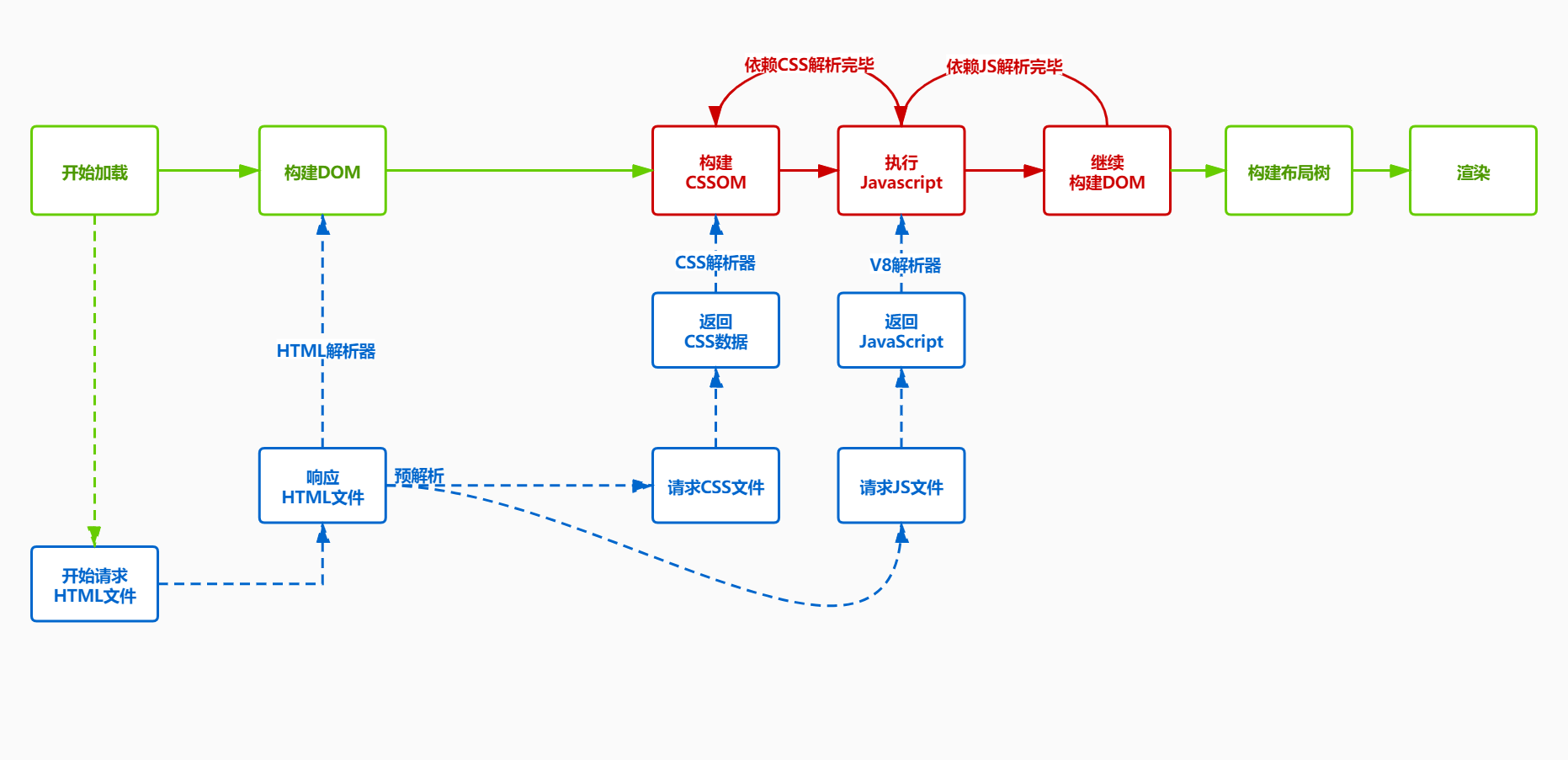
- CSS加载不会影响DOM解析
- CSS加载不会阻塞JS加载,但是会阻塞JS执行
- JS会依赖CSS加载,JS会阻塞DOM解析
3.8.1 server\public\load.html #
server\public\load.html
<html>
<head>
    <link href="/hello.css" rel="stylesheet" />
</head>
<body>
    <div id="hello">hello</div>
    <script src="/hello.js"></script>
    <script>
        console.log('world');
    </script>
</body>

</html>
3.8.2 server\public\hello.css #
server\public\hello.css
#hello {
    color: green;
    width: 100px;
    height: 100px;
    background: red;
}
3.8.3 server\public\hello.js #
server\public\hello.js
console.log('hello');3.8.4 client\network.js #
client\network.js
const EventEmitter = require('events');
+const http = require('http');
class Network extends EventEmitter {
+   fetchResource(options) {
+       return new Promise((resolve) => {
+           //3.在网络进程中发起URL请求
+           let request = http.request(options, (response) => {
+               //4.网络进程接收到响应头数据并转发给主进程
+               const headers = response.headers;
+               const buffers = [];
+               response.on('data', (buffer) => {
+                   buffers.push(buffer);
+               });
+               response.on('end', () => {
+                   resolve({
+                       headers,
+                       body: Buffer.concat(buffers).toString()
+                   });
+               });
+           });
+           //结束请求体
+           request.end();
+       });
+   }
}
const network = new Network();
module.exports = network;
3.8.5 client\request.js #
client\request.js
const htmlparser2 = require('htmlparser2');
const http = require('http');
const css = require("css");
const { createCanvas } = require('canvas')
const fs = require('fs')
const main = require('./main.js');
const network = require('./network.js');
const render = require('./render.js');
const gpu = require('./gpu.js');
const host = 'localhost';
const port = 80;
+const loadingLinks = {};
+const loadingScripts = {};
Array.prototype.top = function () {
    return this[this.length - 1];
}
/** 浏览器主进程 **/
main.on('request', function (options) {
    //2.主进程把该URL转发给网络进程
    network.emit('request', options);
})
//开始准备渲染页面
main.on('prepareRender', function (response) {
    //5.主进程发送提交导航消息到渲染进程
    render.emit('commitNavigation', response);
})
main.on('confirmNavigation', function () {
    console.log('confirmNavigation');
})
main.on('DOMContentLoaded', function () {
    console.log('DOMContentLoaded');
})
main.on('Load', function () {
    console.log('Load');
})
main.on('drawQuad', function () {
    //14.浏览器主进程然后会从GPU内存中取出位图显示到页面上
    let drawSteps = gpu.bitMaps.flat();
    const canvas = createCanvas(150, 250);
    const ctx = canvas.getContext('2d');
    console.log(drawSteps.join('\r\n'));
    eval(drawSteps.join('\r\n'));
    fs.writeFileSync('result.png', canvas.toBuffer('image/png'));
})

/** 网络进程 **/
network.on('request', function (options) {
    //3.在网络进程中发起URL请求
    let request = http.request(options, (response) => {
        //4.网络进程接收到响应头数据并转发给主进程
        main.emit('prepareRender', response);
    });
    //结束请求体
    request.end();
})

/** 渲染进程 **/
//6.渲染进程开始从网络进程接收HTML数据
render.on('commitNavigation', function (response) {
    const headers = response.headers;
    const contentType = headers['content-type'];
    if (contentType.indexOf('text/html') !== -1) {
        //1. 渲染进程把HTML转变为DOM树型结构
        const document = { type: 'document', attributes: {}, children: [] };
        const cssRules = [];
        const tokenStack = [document];
        const parser = new htmlparser2.Parser({
            onopentag(name, attributes = {}) {
                const parent = tokenStack.top();
                const element = {
                    type: 'element',
                    tagName: name,
                    children: [],
                    attributes,
                    parent
                }
                parent.children.push(element);
                tokenStack.push(element);
            },
            ontext(text) {
                if (!/^[\r\n\s]*$/.test(text)) {
                    const parent = tokenStack.top();
                    const textNode = {
                        type: 'text',
                        children: [],
                        attributes: {},
                        parent,
                        text
                    }
                    parent.children.push(textNode);
                }
            },
            /**
             * 在预解析阶段,HTML发现CSS和JS文件会并行下载,等全部下载后先把CSS生成CSSOM,然后再执行JS脚本
             * 然后再构建DOM树,重新计算样式,构建布局树,绘制页面
             * @param {*} tagname
             */
            onclosetag(tagname) {
                switch (tagname) {
                    case 'style':
                        const styleToken = tokenStack.top();
                        const cssAST = css.parse(styleToken.children[0].text);
                        cssRules.push(...cssAST.stylesheet.rules);
                        break;
+                    case 'link':
+                        const linkToken = tokenStack[tokenStack.length - 1];
+                        const href = linkToken.attributes.href;
+                        const options = { host, port, path: href }
+                        const promise = network.fetchResource(options).then(({ body }) => {
+                            delete loadingLinks[href];
+                            const cssAST = css.parse(body);
+                            cssRules.push(...cssAST.stylesheet.rules);
+                        });
+                        loadingLinks[href] = promise;
+                        break;
+                    case 'script':
+                        const scriptToken = tokenStack[tokenStack.length - 1];
+                        const src = scriptToken.attributes.src;
+                        if (src) {
+                            const options = { host, port, path: src };
+                            const promise = network.fetchResource(options).then(({ body }) => {
+                                delete loadingScripts[src];
+                                return Promise.all([...Object.values(loadingLinks), Object.values(loadingScripts)]).then(() => {
+                                    eval(body);
+                                });
+                            });
+                            loadingScripts[src] = promise;
+                        } else {
+                            const script = scriptToken.children[0].text;
+                            const ts = Date.now() + '';
+                            const promise = Promise.all([...Object.values(loadingLinks), ...Object.values(loadingScripts)]).then(() => {
+                                delete loadingScripts[ts];
+                                eval(script);
+                            });
+                            loadingScripts[ts] = promise;
+                        }
+                        break;
+                    default:
+                        break;
+                }
                tokenStack.pop();
            },
        });
        //开始接收响应体
        response.on('data', (buffer) => {
            //8.渲染进程开始HTML解析和加载子资源
            //网络进程加载了多少数据,HTML 解析器便解析多少数据。
            parser.write(buffer.toString());
        });
        response.on('end', () => {
+            Promise.all(Object.values(loadingScripts)).then(() => {
                //7.HTML接收接受完毕后通知主进程确认导航
                main.emit('confirmNavigation');
                //3. 通过stylesheet计算出DOM节点的样式
                recalculateStyle(cssRules, document);
                //4. 根据DOM树创建布局树,就是复制DOM结构并过滤掉不显示的元素
                const html = document.children[0];
                const body = html.children[1];
                const layoutTree = createLayout(body);
                //5.并计算各个元素的布局信息
                updateLayoutTree(layoutTree);
                //6. 根据布局树生成分层树
                const layers = [layoutTree];
                createLayerTree(layoutTree, layers);
                //7. 根据分层树进行生成绘制步骤并复合图层
                const paintSteps = compositeLayers(layers);
                //8.把绘制步骤交给渲染进程中的合成线程进行合成
                //9.合成线程会把图层划分为图块(tile)
                const tiles = splitTiles(paintSteps);
                //10.合成线程会把分好的图块发给栅格化线程池
                raster(tiles);
                //触发DOMContentLoaded事件
                main.emit('DOMContentLoaded');
                //9.HTML解析完毕和加载子资源页面加载完成后会通知主进程页面加载完成
                main.emit('Load');
+            });
        });
    }
})
function splitTiles(paintSteps) {
    return paintSteps;
}
function raster(tiles) {
    //11.栅格化线程会把图片(tile)转化为位图
    tiles.forEach(tile => rasterThread(tile));
    //13.当所有的图块都光栅化之后合成线程会发送绘制图块的命令给浏览器主进程
    main.emit('drawQuad');
}
function rasterThread(tile) {
    //12.而其实栅格化线程在工作的时候会把栅格化的工作交给GPU进程来完成
    gpu.emit('raster', tile);
}
function compositeLayers(layers) {
    //10.合成线程会把分好的图块发给栅格化线程池,栅格化线程会把图片(tile)转化为位图
    return layers.map(layout => paint(layout));
}
function paint(element, paintSteps = []) {
    const { background = 'black', color = 'black', top = 0, left = 0, width = 100, height = 0 } = element.layout;
    if (element.type === 'text') {
        paintSteps.push(`ctx.font = '20px Impact;'`);
        paintSteps.push(`ctx.strokeStyle = '${color}';`);
        paintSteps.push(`ctx.strokeText("${element.text.replace(/(^\s+|\s+$)/g, '')}", ${left},${top + 20});`);
    } else if (element.tagName) {
        paintSteps.push(`ctx.fillStyle="${background}";`);
        paintSteps.push(`ctx.fillRect(${left},${top}, ${parseInt(width)}, ${parseInt(height)});`);
    }
    element.children.forEach(child => paint(child, paintSteps));
    return paintSteps;
}
function createLayerTree(element, layers) {
    element.children = element.children.filter((child) => createNewLayer(child, layers));
    element.children.forEach(child => createLayerTree(child, layers));
    return layers;
}
function createNewLayer(element, layers) {
    let created = true;
    const attributes = element.attributes;
    Object.entries(attributes).forEach(([key, value]) => {
        if (key === 'style') {
            const attributes = value.split(';');
            attributes.forEach((attribute) => {
                const [property, value] = attribute.split(/:\s*/);
                if (property === 'position' && value === 'absolute') {
                    updateLayoutTree(element);//对单独的层重新计算位置
                    layers.push(element);
                    created = false;
                }
            });
        }
    });
    return created;
}
function updateLayoutTree(element, top = 0, parentTop = 0) {
    const computedStyle = element.computedStyle;
    element.layout = {
        top: top + parentTop,
        left: 0,
        width: computedStyle.width,
        height: computedStyle.height,
        background: computedStyle.background,
        color: computedStyle.color,
    }
    let childTop = 0;
    element.children.forEach(child => {
        updateLayoutTree(child, childTop, element.layout.top);
        childTop += parseInt(child.computedStyle.height || 0);
    });
}
function createLayout(element) {
    element.children = element.children.filter(isShow);
    element.children.forEach(child => createLayout(child));
    return element;
}
function isShow(element) {
    let isShow = true;
    if (element.tagName === 'head' || element.tagName === 'script') {
        isShow = false;
    }
    const attributes = element.attributes;
    Object.entries(attributes).forEach(([key, value]) => {
        if (key === 'style') {
            const attributes = value.split(';');
            attributes.forEach((attribute) => {
                const [property, value] = attribute.split(/:\s*/);
                if (property === 'display' && value === 'none') {
                    isShow = false;
                }
            });
        }
    });
    return isShow;
}
function recalculateStyle(cssRules, element, parentComputedStyle = {}) {
    const attributes = element.attributes;
    element.computedStyle = { color: parentComputedStyle.color }; // 计算样式
    Object.entries(attributes).forEach(([key, value]) => {
        //stylesheets
        cssRules.forEach(rule => {
            let selector = rule.selectors[0].replace(/\s+/g, '');
            if ((selector == '#' + value && key == 'id') || (selector == '.' + value && key == 'class')) {
                rule.declarations.forEach(({ property, value }) => {
                    element.computedStyle[property] = value;
                })
            }
        })
        //行内样式
        if (key === 'style') {
            const attributes = value.split(';');
            attributes.forEach((attribute) => {
                const [property, value] = attribute.split(/:\s*/);
                element.computedStyle[property] = value;
            });
        }
    });
    element.children.forEach(child => recalculateStyle(cssRules, child, element.computedStyle));
}
gpu.on('raster', (tile) => {
    //13.最终生成的位图就保存在了GPU内存中
    let bitMap = tile;
    gpu.bitMaps.push(bitMap);
});
//1.主进程接收用户输入的URL
+main.emit('request', { host, port, path: '/load.html' });